> For the complete documentation index, see [llms.txt](https://acoservice.gitbook.io/acoservice-documentation/llms.txt). Markdown versions of documentation pages are available by appending `.md` to page URLs; this page is available as [Markdown](https://acoservice.gitbook.io/acoservice-documentation/troubleshooting/wrong-member-charged.md).

# Wrong member charged

How the bot decides whose checkout it is, why it sometimes picks the wrong person, and how to correct the charge.

A tab entry has landed on the wrong person. Two jobs here: undo the charge, and stop it recurring. Undoing is quick; the cause is almost always an identifier that is too short.

## How a checkout gets attached to a member

The checkout embed your bot reads carries a `Profile` field — the name of the profile your *checkout* bot used to place the order, like `Target - Ahmed #7`. Your bot turns that string into a Discord user by trying three strategies in order and stopping at the first that resolves.

| # | Strategy  | Shape it expects                                  | What it matches on                                                                                                |
| - | --------- | ------------------------------------------------- | ----------------------------------------------------------------------------------------------------------------- |
| 1 | Canonical | `Retailer - User #N`, e.g. `Walmart - Ahmed #141` | The `User` part, matched against a customer's name first, then against that customer's identifiers                |
| 2 | Legacy    | `Name STORECODE Number`, e.g. `Ahmed TGT 3`       | The leading words as a customer name, the second-to-last token as a store code                                    |
| 3 | Substring | Anything at all                                   | Every identifier of every customer, longest first — the first one *contained anywhere* in the profile string wins |

Strategy 3 is the one that misfires. It does not require a word boundary, a separator or a position. An identifier of `sam` matches `Sams #5`, `Samantha - Target #3` and `Walmart - Samir #12` equally well, and whichever customer owns `sam` collects all three.

Identifiers are sorted longest-first precisely to reduce this — a customer with `samir` registered beats a customer with `sam` on a profile containing "Samir". But if nobody has the longer identifier registered, the short one wins by default.

{% hint style="warning" %}
Never register an identifier shorter than about five characters, and never register one that is a prefix of another member's name or of a retailer name. `ahmed` is fine. `sam`, `max`, `tar` and `pkc` are how members end up paying for each other's boxes.
{% endhint %}

## What actually got charged, and when

A tab entry is only created when **all** of these hold:

* The status classified as a **success** or a **review hold**. Declines and cancellations are DM'd and posted to the feed but never billed.
* **Auto-accumulate** is on for your guild (**Admin → Billing**).
* The quantity is between 1 and 1000 and the unit price is within range.

The price comes from your product list. If the product isn't priced yet, the entry is still created at **$0.00** — it appears on the tab but is skipped by invoicing until you price it.

Members flagged as **free ACO** for that store still get an entry, recorded immediately as `paid` and noted "Free ACO", so you can see what was given away without it inflating a balance.

## Correcting the entry

Open **Admin → Tabs** and find the entry under the member's row. Right-click it.

Confirm you have the right row before you touch it. **Show in checkout\_events…** opens the raw checkout event the entry came from, and **Open source Discord message ↗** jumps straight to the original embed in Discord — the profile string on that embed is the evidence for who it really belongs to.

Then:

1. **Delete entry** on the wrong member's row. This is a soft delete — the entry's status becomes `removed`, so the audit trail survives and the balance drops.
2. Right-click the correct member's row → **Add charge…** and re-enter it. The modal takes a **User ID** (a Discord ID), a **Product** (search the existing list or type a new one, which gets added to your product list automatically), **Quantity**, **Unit Price ($)** and optional **Notes**, and previews the total before you submit.

{% hint style="info" %}
There is no "move this entry to another member" action, by design — an entry belongs to the tab it was written on. Delete-and-re-add is the supported correction, and it leaves both halves visible in the record.
{% endhint %}

If the wrong entry has already been **invoiced or paid**, don't delete it silently. The right-click menu also offers **Edit qty…**, **Edit unit price…**, **Edit notes…** and **Override status…**, and the member's row menu has **Apply discount…** — between them you can neutralise the charge on an invoice that has already gone out while leaving the paperwork intact. Tell the member either way.

## Fixing the cause

Go to **Admin → Customers**.

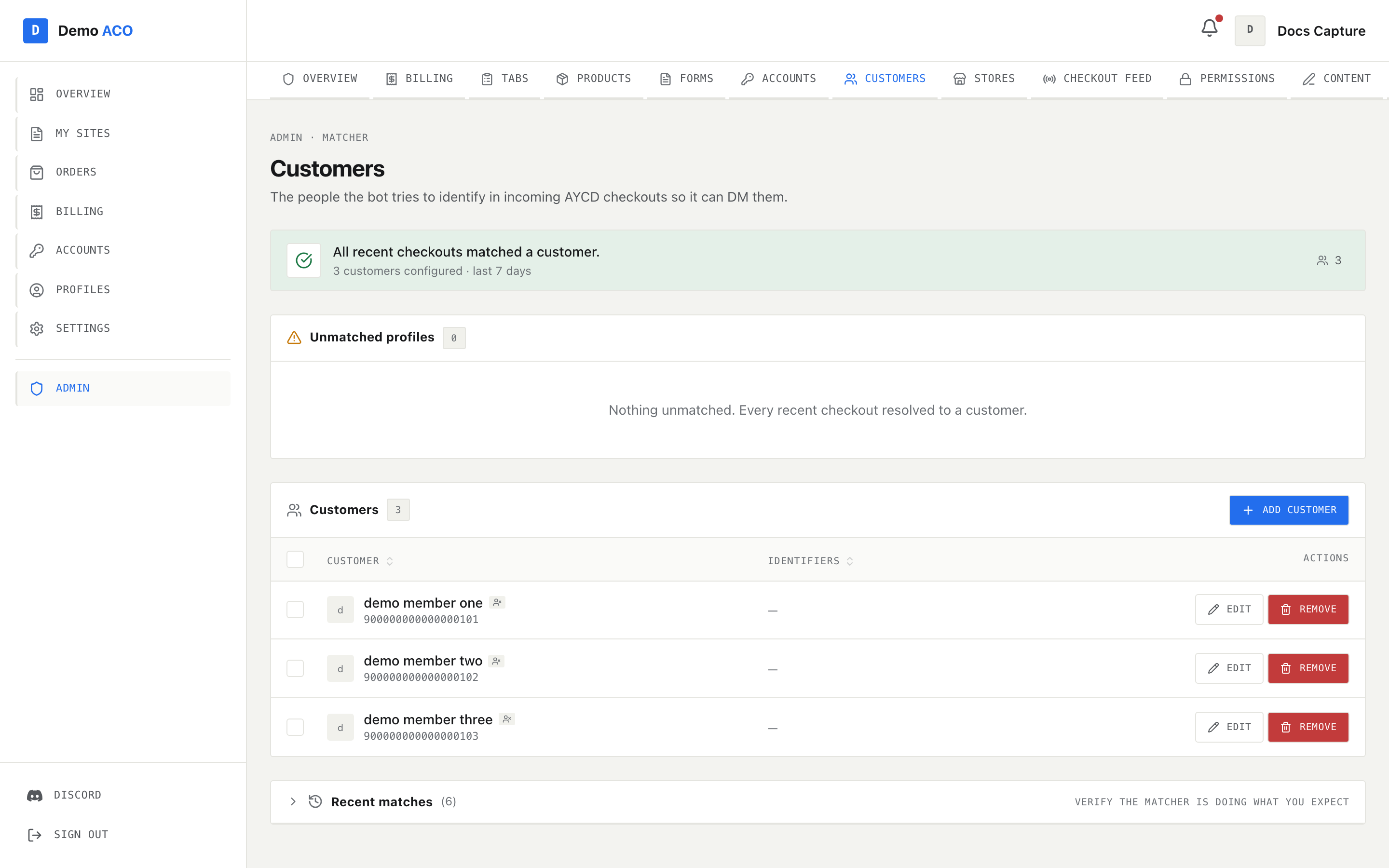
<figure><img src="https://619092889-files.gitbook.io/~/files/v0/b/gitbook-x-prod.appspot.com/o/spaces%2FYF2YIy2qTYyy9j61lr0Y%2Fuploads%2Fgit-blob-2f16143116dfa2f4e2b74990c97a335688152434%2Fcustomers.png?alt=media" alt="The admin Customers page with the health banner, the unmatched profiles panel and the customers table"><figcaption><p>The banner counts unmatched checkouts in the last seven days. The Unmatched profiles panel is where you map a profile string onto the right customer.</p></figcaption></figure>

The banner at the top reads either *"All recent checkouts matched a customer"* or *"N checkouts in the last 7 days couldn't be matched to any customer"*, with a **Fix unmatched →** shortcut.

* **Unmatched profiles** lists each unresolved profile string with a **Parsed** column (what the canonical parser made of it, or *non-canonical*) and a **Hits** count. **Assign** attaches it to an existing customer; **New** creates a customer pre-filled from the parsed name.
* The customers table lists **Customer** and **Identifiers**. Edit the identifiers inline as a comma-separated list. This is where you remove the over-broad identifier that caused the mis-charge, and add the specific one that should have won.

The **Assign** dialog also offers two follow-ups worth understanding:

* *Attach orphaned checkouts to this customer* walks the last **30 days** of unmatched checkout events and attaches any that now resolve — adding them to the member's tab if auto-accumulate is on.
* *DM the member for each retroactively matched checkout* sends the same message the live feed would have sent, respecting their notification preferences.

Both are on by default. Turn the backfill off if you are only correcting a naming convention and don't want a month of historical charges appearing on a tab.

{% hint style="danger" %}
Removing an over-broad identifier fixes the future, not the past. Any entries it already mis-attached stay where they are until you correct them by hand.
{% endhint %}

## Preventing it

Standardise on the canonical profile format — `Retailer - Member #N` — in the checkout bots that feed you. It is the only shape that resolves without ever reaching the substring fallback, and it gives you the retailer for free.

## Related

* [Customers](/acoservice-documentation/for-tenant-admins/customers.md) — the full matcher reference.
* [Tabs](/acoservice-documentation/for-tenant-admins/tabs.md) — entries, groups, discounts and free ACO.
* [Members not getting DMs](/acoservice-documentation/troubleshooting/dms-not-arriving.md) — an unmatched profile means no DM at all.
* [Feed not catching checkouts](/acoservice-documentation/troubleshooting/feed-not-catching.md).


---

# Agent Instructions
This documentation is published with GitBook. GitBook is the documentation platform designed so that both humans and AI agents can read, navigate, and reason over technical content effectively. Learn more at gitbook.com.

## Querying This Documentation
If you need additional information that is not directly available in this page, you can query the documentation dynamically by asking a question.

Perform an HTTP GET request on the current page URL with the `ask` query parameter, and the optional `goal` query parameter:

```
GET https://acoservice.gitbook.io/acoservice-documentation/troubleshooting/wrong-member-charged.md?ask=<question>&goal=<endgoal>
```

`ask` is the immediate question: it should be specific, self-contained, and written in natural language.
`goal` is optional and describes the broader end goal you are ultimately trying to accomplish on behalf of the user. GitBook uses it to tailor the answer towards what is most useful for that goal.

The response will contain a direct answer to the question and relevant excerpts and sources from the documentation.

Use this mechanism when the answer is not explicitly present in the current page, you need clarification or additional context, or you want to retrieve related documentation sections.
