> For the complete documentation index, see [llms.txt](https://acoservice.gitbook.io/acoservice-documentation/llms.txt). Markdown versions of documentation pages are available by appending `.md` to page URLs; this page is available as [Markdown](https://acoservice.gitbook.io/acoservice-documentation/troubleshooting/feed-not-catching.md).

# Feed not catching checkouts

What to check when checkouts are landing in your webhook channel but nothing reaches your feed, your members, or their tabs.

Your checkout bots are posting webhooks. Nothing appears in the feed channel, nobody gets a DM, and no tab entries appear. Work down this page in order — the checks are ordered by how often they turn out to be the cause.

## How the feed actually works

Your bot does not receive webhook messages as they happen. It **polls**. Every source channel has its own cursor — the ID of the last message the bot has already read — and on each pass the bot asks Discord for up to 200 messages after that cursor.

The loop ticks every 5 seconds while a guild is active, and drops to roughly every 30 seconds when nothing has been seen recently. So a lag of half a minute on a quiet day is normal; a lag of ten minutes is not.

Each embed found is parsed, classified, saved as a checkout event, posted to the feed, DM'd to the matched member, and (if auto-accumulate is on) added to their tab. All of that happens in one pass — which is why a failure here takes out DMs and billing too, not just the feed channel.

## 1. Is the feed switched on and pointed somewhere?

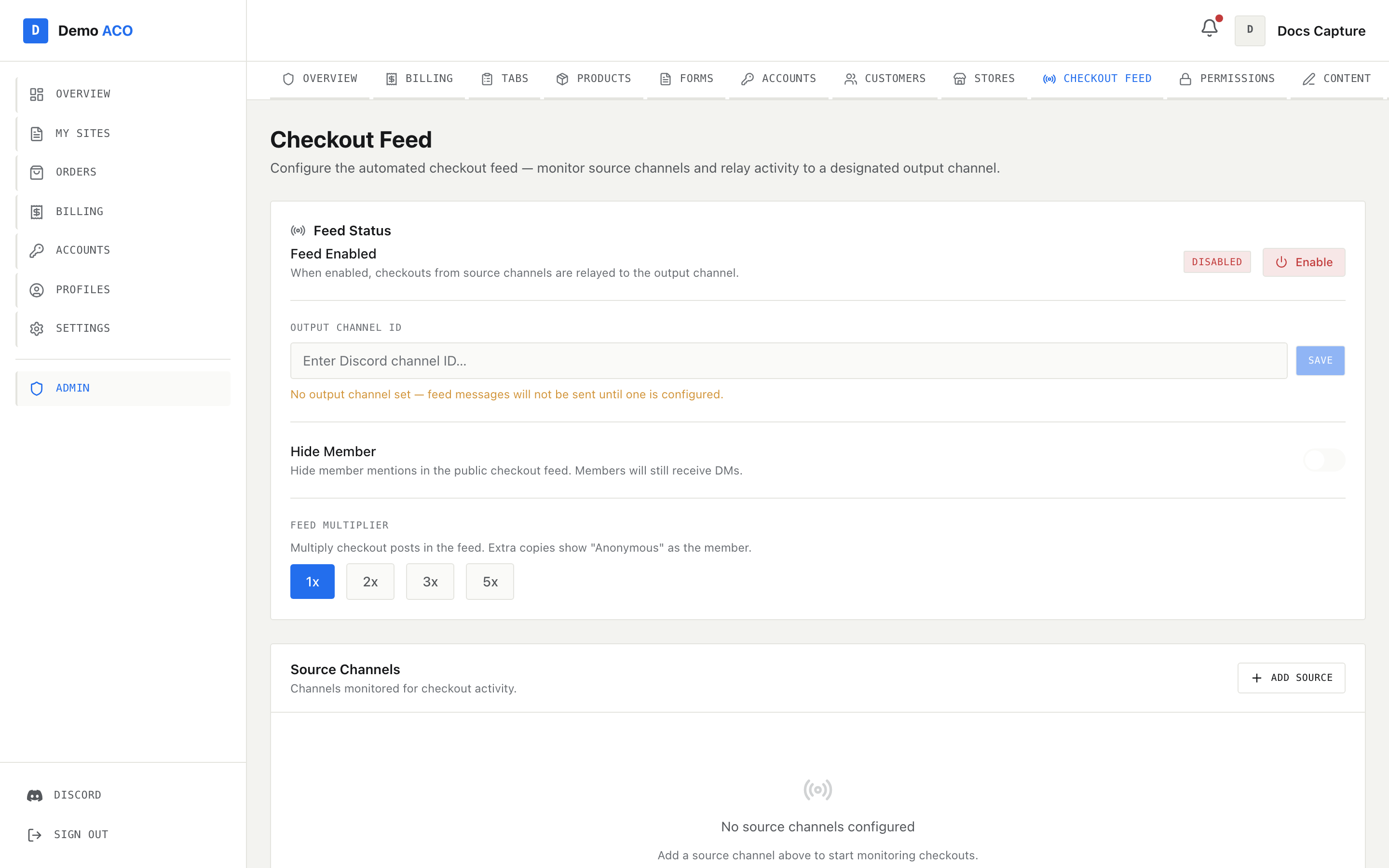
Open **Admin → Checkout Feed**.

<figure><img src="https://619092889-files.gitbook.io/~/files/v0/b/gitbook-x-prod.appspot.com/o/spaces%2FYF2YIy2qTYyy9j61lr0Y%2Fuploads%2Fgit-blob-1c32d97e542d5e2362e43ff9f3edc0c510990a0d%2Ffeed.png?alt=media" alt="The admin Checkout Feed page showing the Feed Status card and the Source Channels table"><figcaption><p>Feed Status carries the Enabled/Disabled badge, the output channel, Hide Member and the feed multiplier. Source Channels lists every channel being polled with its cursor.</p></figcaption></figure>

* The **Feed Enabled** row shows an `Enabled` or `Disabled` badge and a button that toggles it.
* **Output channel ID** is the channel formatted embeds get posted to. If it is blank the page warns: *"No output channel set — feed messages will not be sent until one is configured."*
* **Source channels** lists each polled channel with its **Channel ID** and **Last Message ID**. If it says *"No source channels configured"*, nothing is being polled at all.

{% hint style="danger" %}
If the output channel ID is set but the bot cannot resolve it — wrong ID, channel deleted, or the bot can't see it — the whole pass aborts **before any source channel is read**. No feed posts, no DMs, and no tab entries, even though the sources are fine. A broken output channel looks exactly like a dead feed.
{% endhint %}

## 2. Can the bot see both channels?

The output channel must be a channel in **your own** Discord server. Source channels may live in a different server (that is the normal setup — your checkout bot posts to a private channel elsewhere), but **your bot must be a member of that server** and able to read the channel.

In the source channel, the bot needs **View Channel** and **Read Message History**. In the output channel it needs **View Channel**, **Send Messages** and **Embed Links**. Check the channel's permission overwrites, not just the bot's role — a category-level deny is the usual culprit.

## 3. Are the privileged intents enabled?

Your bot process requests two privileged gateway intents: **Message Content** and **Server Members**. Both have to be switched on in the Discord Developer Portal under your application → **Bot** → *Privileged Gateway Intents*.

If either is off, Discord refuses the connection and the bot never comes online at all — so the symptom is a silent bot everywhere, not just a silent feed. If slash commands are also dead, start at [The bot is offline or missing](/acoservice-documentation/troubleshooting/bot-unresponsive.md) instead.

## 4. Check the cursor

When you add a source channel, the bot seeds the cursor to that channel's **newest existing message**. Only messages posted *after* that point are ever processed.

Two consequences worth knowing:

* Adding a source channel mid-drop does **not** backfill the checkouts that already happened. Add sources before the drop, not during it.
* If the channel was completely empty when you added it, the cursor stays unset until a message arrives — and that first message becomes the cursor rather than being processed. Send a `/checkout-feed test` embed after adding a source to burn that slot deliberately.

There is also a catch-up circuit breaker. If the cursor is more than **24 hours** stale *and* more than **50** messages are waiting, the bot skips the backlog and jumps to the newest message rather than replaying a day of checkouts into your feed. Those skipped checkouts are gone as far as the feed is concerned; add any real charges by hand.

## 5. Is the embed format one the parser knows?

The parser has field maps for four checkout bots. It identifies which one it is looking at from the embed's own shape:

| Format          | Recognised by                                                                                                                    |
| --------------- | -------------------------------------------------------------------------------------------------------------------------------- |
| Prism / Refract | An author line containing a `\|` separator, such as `Successful Checkout \| Walmart`; or an author name plus a `Product` field   |
| Shikari         | An author name or footer containing `shikari` plus a description; or a `Site` field and a description containing a markdown link |
| Stellara        | A footer containing `stellara` (Stellara's own footer is `@stellara_io`); or a `Site` field and a title wrapped in `**`          |
| HiddenAIO       | A `Module` field, or a footer containing `HiddenAIO`                                                                             |

Anything else is treated as **unknown format**, and the bot deliberately refuses to guess. It does not parse the fields, does not post to the feed, does not DM anyone, and does not bill anyone.

{% hint style="warning" %}
This refusal is on purpose and it is the behaviour most likely to surprise you. An unrecognised embed usually still has a title reading "Successful Checkout" — but Product, Price, Quantity and Profile were never read, because the parser had no map for where they live. Trusting the title there means invoicing a member for a checkout nobody could read. Unknown means unknown: the event is logged for your platform operator, and nothing is charged.
{% endhint %}

If you have switched checkout bots, or your bot vendor changed their embed layout, this is your answer. Send the raw embed to your platform operator so the format can be added.

## 6. Check the status text

Even in a known format, the *status* has to classify. Here is what each classification does:

| Classified as | Typical status text                                                | Feed post | Member DM | Tab entry                                  |
| ------------- | ------------------------------------------------------------------ | --------- | --------- | ------------------------------------------ |
| Success       | "Successful Checkout", "Checked Out!", "Successfully Checked Out"  | Yes       | Yes       | Yes, if auto-accumulate is on              |
| Review hold   | Anything containing "review" or "hold"                             | Yes       | Yes       | Yes, noted "Review Hold — may be canceled" |
| Decline       | "Your card was declined", "Payment Declined", "Checkout Failed"    | Yes       | Yes       | No                                         |
| Cancel        | "Order Canceled…", "Item Demand", "quantity limit", "out of stock" | Yes       | Yes       | No                                         |
| Unrecognised  | Anything else                                                      | No        | No        | No                                         |

Review is tested before success, so `Successful Checkout (Review Hold)` is a review hold, not a success. An unrecognised status is ignored entirely rather than assumed to be a success.

## 7. Send a test checkout

`/checkout-feed test` posts a synthetic embed into one of your own source channels, in a format and status you choose. Pick the format matching your real checkout bot and the `Success` status. If the test embed comes through and your real ones don't, the problem is the embed format (step 5), not the plumbing.

`/checkout-feed status` prints the same config the admin page shows — enabled state, each source channel and its cursor, and the output channel — which is handy when you want to check from Discord.

## Related

* [Checkout feed](/acoservice-documentation/for-tenant-admins/checkout-feed.md) — configuring sources, the multiplier and Hide Member.
* [Checkout feed sources](/acoservice-documentation/discord-integration/feed-sources.md) — the Discord side.
* [Wrong member charged](/acoservice-documentation/troubleshooting/wrong-member-charged.md) — the feed fired but attached the checkout to the wrong person.
* [Members not getting DMs](/acoservice-documentation/troubleshooting/dms-not-arriving.md) — the feed posted but nobody was notified.
* [Pre-drop checklist](/acoservice-documentation/day-to-day-operations/pre-drop-checklist.md).


---

# Agent Instructions
This documentation is published with GitBook. GitBook is the documentation platform designed so that both humans and AI agents can read, navigate, and reason over technical content effectively. Learn more at gitbook.com.

## Querying This Documentation
If you need additional information that is not directly available in this page, you can query the documentation by asking a question.

Perform an HTTP GET request on the following URL with the `ask` and `goal` query parameters:

```
GET https://acoservice.gitbook.io/acoservice-documentation/troubleshooting/feed-not-catching.md?ask=<question>&goal=<user_goal>
```

`ask` is the immediate question: it should be specific, self-contained, and written in natural language.
`goal` is what the user is ultimately trying to achieve, the reason they need the answer. Sharing it helps GitBook give you a better, more relevant answer. A goal is most helpful when it describes the outcome the user wants rather than restating the question. For example, with `ask=how do I create an API token`, a goal like `automate deployments from our CI pipeline` lets GitBook tailor the answer to that use case.

The response will contain a direct answer to the question and relevant excerpts and sources from the documentation.

Use this mechanism when the answer is not explicitly present in the current page, you need clarification or additional context, or you want to retrieve related documentation sections.
