> For the complete documentation index, see [llms.txt](https://acoservice.gitbook.io/acoservice-documentation/llms.txt). Markdown versions of documentation pages are available by appending `.md` to page URLs; this page is available as [Markdown](https://acoservice.gitbook.io/acoservice-documentation/troubleshooting/dms-not-arriving.md).
# Members not getting DMs
Why a member gets no checkout alerts, invoices or reminders in Discord, and how to get delivery working again.
A member says they never heard about their checkout, or an invoice, or a payment reminder. Everything else — the site, the feed channel, their tab — looks fine.
Four things have to be true before a DM lands, and they fail in roughly this order of likelihood.
## 1. Was the member matched at all?
A checkout DM only goes to someone the bot could **identify**. The bot reads the `Profile` field on the checkout embed and tries to resolve it to one of your customers. If it can't, the checkout is still recorded and still posted to the feed — but there is nobody to DM, and nothing is added to any tab.
Go to **Admin → Customers**. The *Unmatched profiles* panel lists every profile string from the last seven days that didn't resolve, with a hit count. If the member's profile is in that list, this is your cause, not their DM settings. Fix it there — see [Wrong member charged](/acoservice-documentation/troubleshooting/wrong-member-charged.md) for how identifiers work.
Invoices and payment reminders are different: they are addressed to a Discord ID that is already on the tab, so they don't depend on matching.
## 2. Has the member switched the notification off?
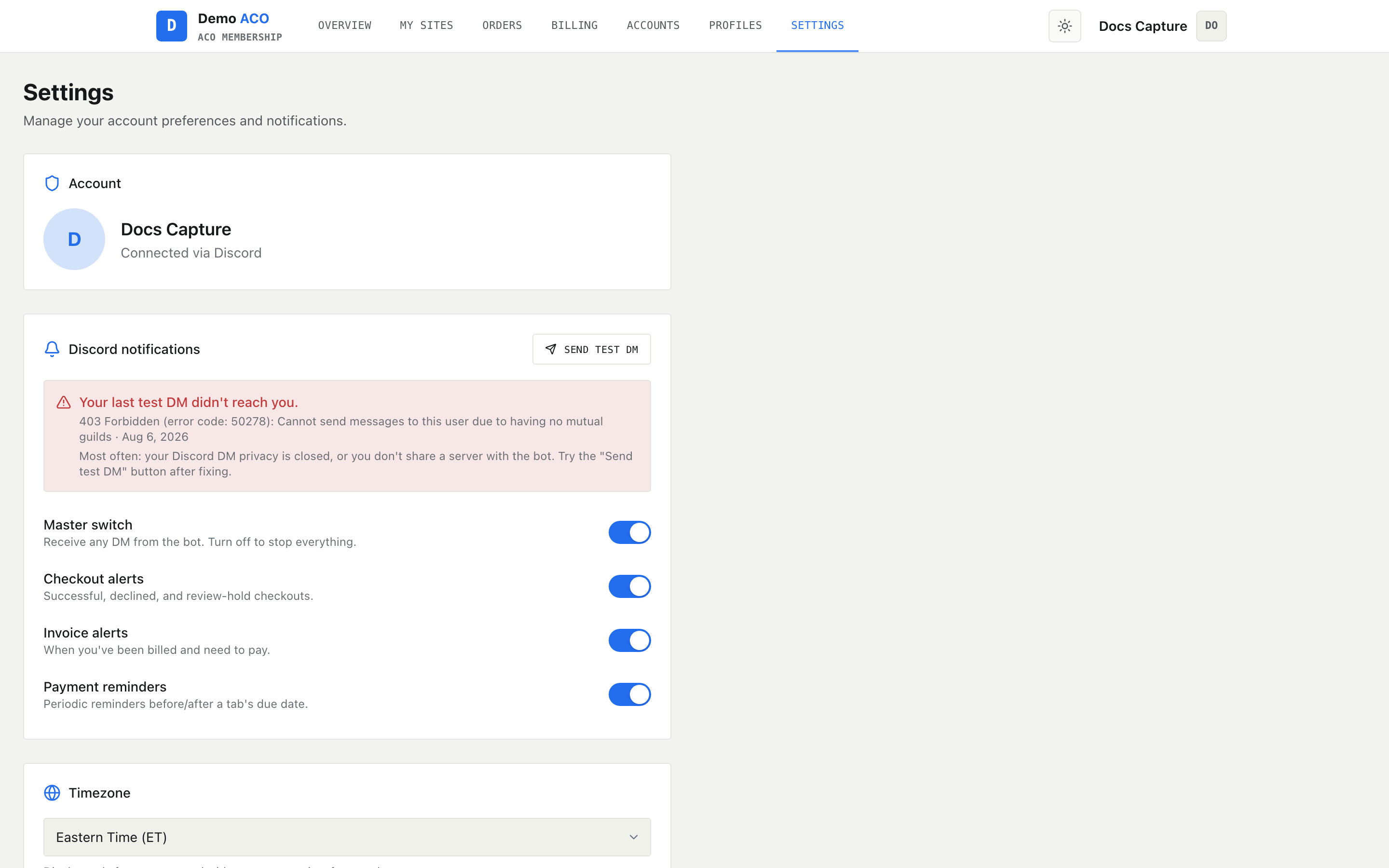
Members control their own DMs at **Settings → Discord notifications** on the site.
Four toggles — a master switch and three categories below it — plus a Send test DM button that bypasses every preference.
| Toggle | What it covers |
| ----------------- | ----------------------------------------------------------- |
| Master switch | Every DM from the bot. Off here means nothing else matters. |
| Checkout alerts | Successful, declined, cancelled and review-hold checkouts. |
| Invoice alerts | Being billed and needing to pay. |
| Payment reminders | Reminders before and after a tab's due date. |
When the master switch is off the other three grey out. An opted-out member is not a delivery failure — the bot skips the send silently and it never appears as an error anywhere.
Your tenant also has a group-wide switch for reminders specifically: **Admin → Billing → Payment Reminders**. With that off, the bot sends no due-date reminders to anyone, whatever the members' own settings say.
## 3. Will Discord let the bot DM them?
Discord refuses a bot DM with a 403, and it is almost always one of these:
* **The member's DM privacy is closed** for your server. In Discord: right-click the server → *Privacy Settings* → allow direct messages from server members. Discord also has a global default for this in user settings, which the per-server toggle overrides.
* **The member does not share a server with the bot.**
* **The member has blocked the bot.**
{% hint style="warning" %}
Every group on ACO Service runs **its own** Discord bot. A member who is in three different ACO groups is sharing a server with three different bots, and each one can only DM them because of the specific server they share with *that* bot. Leaving your Discord server stops your bot's DMs even though the member can still sign in to your site and see everything there.
{% endhint %}
If your tenant has a Discord application but no **bot token** saved, there is no bot process at all — sign-in works perfectly, the site works perfectly, and not a single DM or slash command ever fires. This is the single most common onboarding failure. Your platform operator can confirm it on the tenant's setup-status checklist, where the row reads *"No bot token — sign-in will work but no slash commands will"*. See [Your Discord application](/acoservice-documentation/setting-up-your-tenant/discord-application.md).
## 4. Prove it with a test DM
On **Settings**, the **Send test DM** button sends a one-line message that **ignores every preference toggle**. That makes it a clean test of the Discord side alone:
* Test DM arrives → Discord and the bot are fine. The problem is a preference (step 2) or matching (step 1).
* Test DM fails → the toast shows Discord's own reason. That is a privacy or shared-server problem (step 3).
Every send attempt is logged, so members also get self-service feedback without asking you:
* **Settings** shows a red banner naming the most recent failed DM type, Discord's error text and when it happened.
* **Billing** shows *"Your last invoice DM didn't reach you."* with a **Resend** button. The resend bypasses preferences, but it sends a short pointer back to the dashboard rather than re-rendering the original invoice embed.
## What an admin can do
**Admin → Tabs**, right-click a member's row → **Re-send today's notifications**. This rebuilds one consolidated DM from the tab entries the checkout feed added for them in the last 24 hours, marked `[Resent]`. It does not replay invoices or reminders.
Do it after the member has actually fixed their privacy settings, not before — a resend into closed DMs fails exactly the same way.
{% hint style="info" %}
**A failed DM never voids the money.** When an invoice is created, the tab entries are marked `invoiced` and the invoice is saved *before* the DM is attempted. If the DM bounces, the member is still billed and can pay from the site's Billing page — they just weren't told. Check the [Billing and invoices](/acoservice-documentation/for-tenant-admins/billing.md) page for anyone who looks like they never responded to an invoice.
{% endhint %}
## Related
* [Settings and notifications](/acoservice-documentation/for-members/settings.md) — the member-facing view of these toggles.
* [Notifications and DMs](/acoservice-documentation/discord-integration/notifications.md) — every DM the bot sends and when.
* [Feed not catching checkouts](/acoservice-documentation/troubleshooting/feed-not-catching.md) — if nothing is reaching the feed either, start there.
* [The bot is offline or missing](/acoservice-documentation/troubleshooting/bot-unresponsive.md).
---
# Agent Instructions
This documentation is published with GitBook. GitBook is the documentation platform designed so that both humans and AI agents can read, navigate, and reason over technical content effectively. Learn more at gitbook.com.
## Querying This Documentation
If you need additional information that is not directly available in this page, you can query the documentation dynamically by asking a question.
Perform an HTTP GET request on the current page URL with the `ask` query parameter, and the optional `goal` query parameter:
```
GET https://acoservice.gitbook.io/acoservice-documentation/troubleshooting/dms-not-arriving.md?ask=&goal=
```
`ask` is the immediate question: it should be specific, self-contained, and written in natural language.
`goal` is optional and describes the broader end goal you are ultimately trying to accomplish on behalf of the user. GitBook uses it to tailor the answer towards what is most useful for that goal.
The response will contain a direct answer to the question and relevant excerpts and sources from the documentation.
Use this mechanism when the answer is not explicitly present in the current page, you need clarification or additional context, or you want to retrieve related documentation sections.