> For the complete documentation index, see [llms.txt](https://acoservice.gitbook.io/acoservice-documentation/llms.txt). Markdown versions of documentation pages are available by appending `.md` to page URLs; this page is available as [Markdown](https://acoservice.gitbook.io/acoservice-documentation/troubleshooting/bot-unresponsive.md).

# The bot is offline or missing

Telling apart a missing bot token, a stored token nobody is running, and a bot that is simply not in the server.

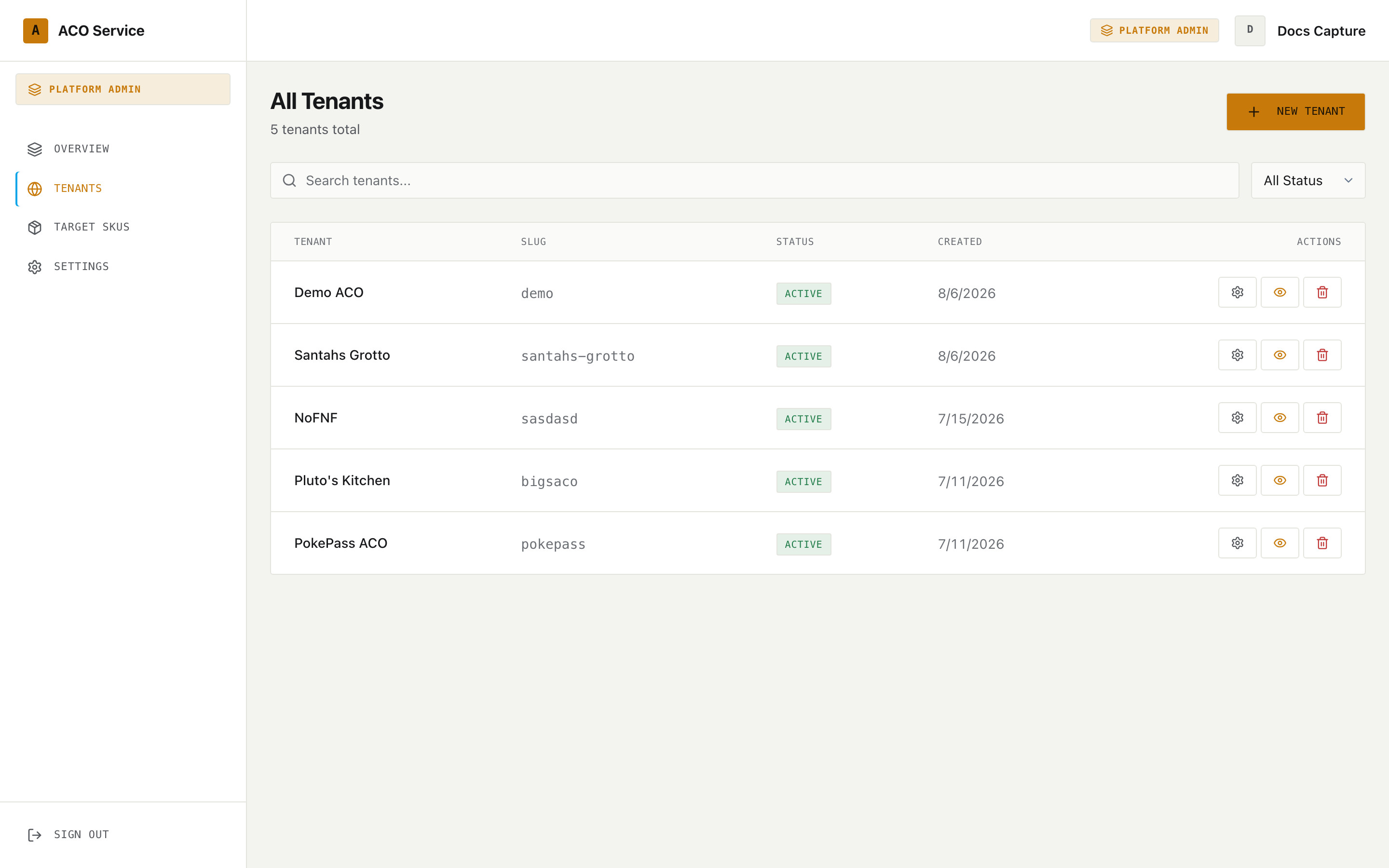
<figure><img src="https://619092889-files.gitbook.io/~/files/v0/b/gitbook-x-prod.appspot.com/o/spaces%2FYF2YIy2qTYyy9j61lr0Y%2Fuploads%2Fgit-blob-cb6395deba1d122f631d9a62cb7a4e65700d97e9%2Ftenant-detail.png?alt=media" alt="Setup Status distinguishing a missing bot token from a bot that is not running"><figcaption><p>The checklist separates the three failures that otherwise look identical from Discord.</p></figcaption></figure>

"The bot isn't working" covers three genuinely different situations, and they need three different fixes. The setup status checklist on the tenant's page distinguishes them precisely, which is why the first useful step is to name which one you are in rather than to describe the symptom.

Every group runs **its own bot**, on its own Discord application. There is no shared bot serving everyone, so "the bot is down" is always about your group's bot specifically.

## The three states

| State                                          | What members see                                                        | What the checklist says                                                                                                                                                               |
| ---------------------------------------------- | ----------------------------------------------------------------------- | ------------------------------------------------------------------------------------------------------------------------------------------------------------------------------------- |
| **No bot token was ever supplied**             | Site works perfectly. No bot in the server at all                       | **Discord bot token saved** fails: *"No bot token — sign-in will work but no slash commands will"*                                                                                    |
| **Token stored, but no process is running it** | Site works. No bot in the server, or a bot that never responds          | **Discord bot token saved** passes; **Bot process running for this tenant** warns that the request is routed to a different Discord application, and *"Their own bot is not running"* |
| **Bot is not in the guild**                    | Bot exists and is online elsewhere, but is absent from your member list | **Bot is in the guild** fails: *"Not in this guild yet — use the invite link"*                                                                                                        |

### 1. No bot token was ever supplied

By far the most common. A Discord application hands out three credentials, and the tenant's OAuth tab captures all three:

* **Client ID** and **Client Secret**, from the OAuth2 tab. These authenticate member **sign-in**.
* **Bot token**, from the **Bot** tab — a different tab, a different credential. This is what a bot process logs into Discord with.

Supply only the first two and you get a site that works flawlessly and a Discord server with no working bot. Nothing about the sign-in experience hints at the gap, which is why this reaches production regularly.

**Fix:** the bot token is set by a platform operator on the tenant's OAuth tab (Developer Portal → Bot → Reset Token, if the original was never saved). Saving it is only half the job — see state 2.

### 2. The token is stored but no process runs it

Storing a token does not start anything. A bot process has to be provisioned to use it. Until that happens, requests for this tenant fall through to whichever bot the platform has routed them to — a different customer's application entirely.

The checklist names this exactly. The **Bot process running for this tenant** row compares the running bot's Discord application against the tenant's own, and when they differ it says so: *"Routed to (), which is a different Discord app than this tenant's. Their own bot is not running."*

**Fix:** a platform operator runs the tenant bot provisioning script for the slug. It reads the stored token, materialises the process and its configuration, and only then routes the tenant to it — that ordering matters, because routing a tenant to a bot that is not answering yet takes their site down rather than degrading it. The script is safe to re-run after a token rotation; re-running updates that one bot and restarts it, and does not touch any other tenant.

See [Provisioning a tenant bot](/acoservice-documentation/for-platform-operators/provisioning-a-bot.md).

### 3. The bot is not in the guild

Here the bot is running — it just has not been invited to your Discord server, or was removed from it.

The checklist's **Bot is in the guild** row fails, and offers an action link: **Invite this tenant's bot to their server**. That link authorises *your* application, not the platform's, with your server preselected. The preselection is a hint rather than a lock, so the link can be forwarded to whoever actually holds Manage Server in your Discord — the platform operator usually does not.

If it instead reads *"Not in this guild, and this tenant has no Discord application configured to invite,"* you are back in state 1: there is no application to invite.

A related failure sits one row above: **Discord guild linked** failing with *"No guild linked — ACO members and checkouts won't be tracked"* means the tenant has no Discord server attached at all. Nothing guild-scoped can work until one is.

{% hint style="warning" %}
The invite requests **Administrator**. That is a deliberate trade: the bot manages roles, channels and messages across the whole server, and a narrower permission set had to be re-granted by hand every time it gained a capability. A server owner approving this link should understand they are trusting the bot fully.
{% endhint %}

## Reading the checklist

The setup status panel lives on the tenant's page in the platform console, at `/platform/tenants/<tenant>`. It runs live checks against that tenant's own bot and summarises them as *"N of M checks passing"*, with blocking issues counted separately. **Re-check** re-runs everything.

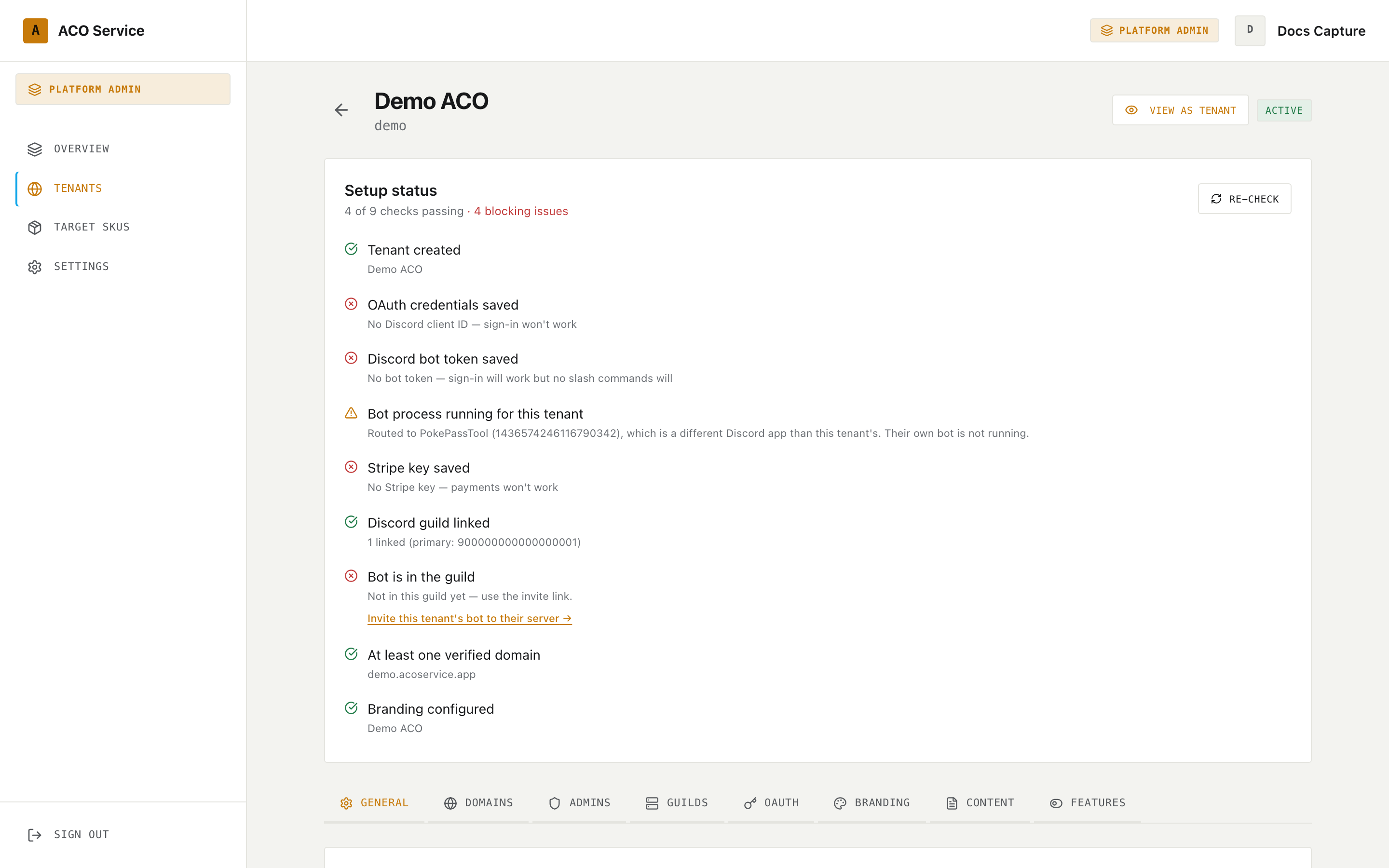
<figure><img src="https://619092889-files.gitbook.io/~/files/v0/b/gitbook-x-prod.appspot.com/o/spaces%2FYF2YIy2qTYyy9j61lr0Y%2Fuploads%2Fgit-blob-2dfc23e9aeb5970eed02e08921cb835b434bf284%2Ftenants.png?alt=media" alt="The platform tenants list"><figcaption><p>Open a tenant from this list to reach its setup status panel. The checklist is platform-operator only — tenant admins cannot see it.</p></figcaption></figure>

Because tenant admins cannot reach it, a group admin's job is to describe the symptom precisely enough that an operator can go straight to the right row.

## Diagnosing from your own server

Without the checklist, you can still narrow it down from Discord:

**Is the bot in your member list at all?**

* No, and members sign in fine → state 1 or state 3.
* Yes, and its status is offline → the process is not running or is disconnected.
* Yes, online, but a command returns "The application did not respond" → the process is up and its handler is failing. Report it; this is not a configuration problem.

**Does `/help` return anything?** If commands do not even appear when you type `/`, the application's commands were never registered with your server — which is state 1 or 3, not a crash.

**Do site pages that read live data still work?** `/admin` (Overview) shows an amber banner reading *"Bot API unavailable — some data may be stale or incomplete."* when it cannot reach the bot. The feed preview returns a `503` saying the bot is not connected to Discord, and the bot-info endpoint answers *"Bot is not connected to Discord yet."* All three point at the process, not at your configuration.

## What happens to checkouts while the bot is down

The source channels keep receiving checkouts from your checkout bots — that data is in Discord and is not lost. What does not happen is everything the bot would have done with it: no feed posts, no DMs, no tab entries.

When the bot comes back it resumes from the position it had stored for each source channel and works through the backlog, so a short outage catches up on its own.

{% hint style="danger" %}
A long outage does not catch up. If the stored position is more than 24 hours old **and** the pending backlog is 50 messages or more, the poller treats it as a real outage, skips the catch-up entirely and jumps to the channel's current tip. Those checkouts are never posted, never DM'd and never booked — they have to be added by hand. A small backlog after a quiet period is processed normally, so this only fires on genuine outages.
{% endhint %}

After a long outage, reconcile deliberately: work through [After the drop](/acoservice-documentation/day-to-day-operations/after-the-drop.md), and expect to add missed charges manually from what is still visible in the source channels.

## What to report

Send a platform operator:

* Your tenant slug.
* Which of the three states matches, if you can tell.
* Whether members can still sign in (they can in states 1, 2 and 3 — if they cannot, the problem is not the bot; see [Sign-in problems](/acoservice-documentation/troubleshooting/sign-in.md)).
* Whether the bot appears in your member list, and whether it is online.
* What `/help` does: replies, appears but does not respond, or does not appear at all.
* When it started, and whether a drop is imminent.

That set is enough to go straight to the right fix — pasting a bot token, provisioning the process, or sending the invite link to whoever holds Manage Server.

***

Related: [Your bot](/acoservice-documentation/setting-up-your-tenant/your-bot.md) · [The setup status checklist](/acoservice-documentation/for-platform-operators/setup-status.md) · [Feed not catching checkouts](/acoservice-documentation/troubleshooting/feed-not-catching.md)


---

# Agent Instructions
This documentation is published with GitBook. GitBook is the documentation platform designed so that both humans and AI agents can read, navigate, and reason over technical content effectively. Learn more at gitbook.com.

## Querying This Documentation
If you need additional information that is not directly available in this page, you can query the documentation dynamically by asking a question.

Perform an HTTP GET request on the current page URL with the `ask` query parameter, and the optional `goal` query parameter:

```
GET https://acoservice.gitbook.io/acoservice-documentation/troubleshooting/bot-unresponsive.md?ask=<question>&goal=<endgoal>
```

`ask` is the immediate question: it should be specific, self-contained, and written in natural language.
`goal` is optional and describes the broader end goal you are ultimately trying to accomplish on behalf of the user. GitBook uses it to tailor the answer towards what is most useful for that goal.

The response will contain a direct answer to the question and relevant excerpts and sources from the documentation.

Use this mechanism when the answer is not explicitly present in the current page, you need clarification or additional context, or you want to retrieve related documentation sections.