> For the complete documentation index, see [llms.txt](https://acoservice.gitbook.io/acoservice-documentation/llms.txt). Markdown versions of documentation pages are available by appending `.md` to page URLs; this page is available as [Markdown](https://acoservice.gitbook.io/acoservice-documentation/for-tenant-admins/stores.md).

# Stores and site access

Store codes map short abbreviations to retailer names, and site access controls which stores a member can see.

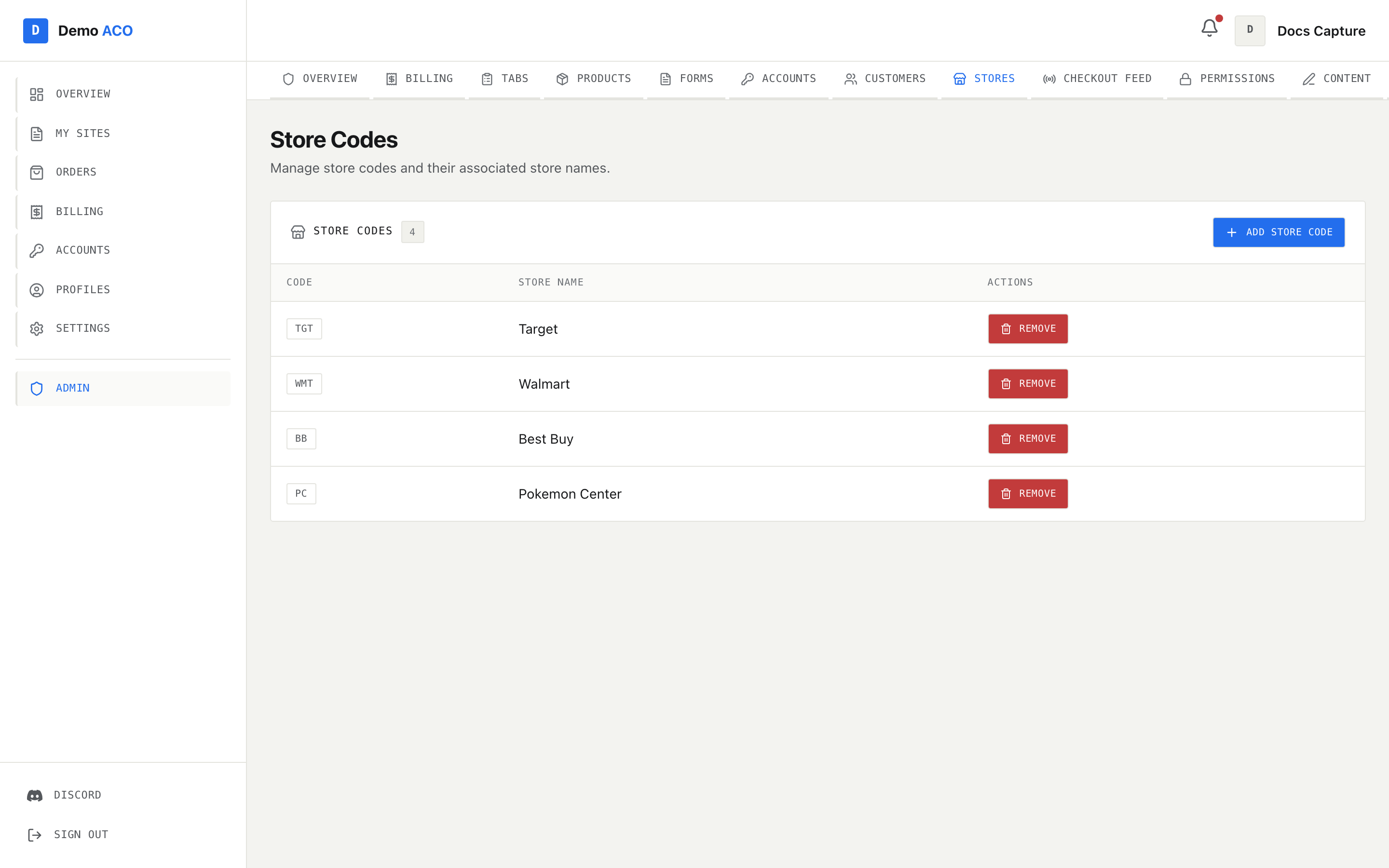
A **store code** is a short uppercase abbreviation — `TGT`, `WMT`, `BB` — mapped to a full retailer name. Almost everything in the product that is "per retailer" is keyed on one: which store a checkout belongs to, which store an assigned account belongs to, which store a form collects profiles for, and which stores a member has access to.

You manage them at **Admin → Stores**.

<figure><img src="https://619092889-files.gitbook.io/~/files/v0/b/gitbook-x-prod.appspot.com/o/spaces%2FYF2YIy2qTYyy9j61lr0Y%2Fuploads%2Fgit-blob-3184c9150f9f2c0256e8990201b64849a22bf8ff%2Fstores.png?alt=media" alt="The Store Codes page listing TGT/Target, WMT/Walmart, BB/Best Buy and PC/Pokemon Center with Remove buttons"><figcaption><p>Store Codes: the code badge, the store name it resolves to, and a Remove action per row. The count sits next to the card title.</p></figcaption></figure>

## Why store codes matter

The checkout feed reads the *profile name* off each checkout embed — something like `Target - Ahmed #7` or `Ahmed TGT 12` — and uses it to work out two things: which member checked out, and which store it was. The store half of that is resolved against this list, matching either the code or the full name. A checkout whose retailer matches nothing here still gets recorded and posted, but it is labelled with whatever text the checkout bot wrote rather than your store name.

Store codes are also what [Accounts](/acoservice-documentation/for-tenant-admins/accounts.md) and [Forms](/acoservice-documentation/for-tenant-admins/forms.md) hang off, and what members see as their "sites".

## Adding and removing codes

**Add Store Code** opens a two-field modal:

| Field      | Notes                                                                            |
| ---------- | -------------------------------------------------------------------------------- |
| Code       | Forced to uppercase as you type, and stored uppercase. Both fields are required. |
| Store Name | The name shown to members and in feed posts, e.g. `Nike SNKRS`.                  |

Removing asks you to confirm first ("Remove store code … This cannot be undone.") and then deletes it.

Two failures are worth knowing about, because the error text is otherwise cryptic:

* **Adding** a code that already exists in a **linked** server fails with "Code exists in a linked server". Linked servers (`/link-server`) share store codes, and the merged list is what you see on this page — so a code you never created here can still block you.
* **Removing** a code that lives in a linked server fails with "Code belongs to a linked server". You can only remove codes that belong to your own server; go to the server that owns it.

While loading you get "Loading store codes…", and with none defined the card shows "No store codes found."

{% hint style="warning" %}
Removing a store code does not clean up after itself. Tab entries, assigned accounts and site-access grants store the code as plain text, so they survive. What changes is the display: a member whose grant referred to `TGT` now sees the raw code `TGT` instead of "Target". Rename by removing and re-adding under the same code, and the name comes back everywhere.
{% endhint %}

## Site access

A **site access grant** is the record that a member is in on a particular store. It is per (member, store) and carries an optional expiry. Members see their grants as cards under "Your sites" — see [Your sites](/acoservice-documentation/for-members/sites.md).

| Status  | How it happens                                            | What the member sees                                         |
| ------- | --------------------------------------------------------- | ------------------------------------------------------------ |
| active  | A grant with no expiry, or an expiry still in the future. | "Active", or "N days left" when the expiry is within a week. |
| expired | The grant's valid-until date has passed.                  | "Expired", with the date.                                    |
| revoked | The grant was explicitly revoked.                         | "Revoked".                                                   |

Expired is never stored — it is worked out from the expiry date every time the grant is read. So there is no nightly job to go wrong, and a grant cannot sit in a stale state.

### How members get access

Grants are created automatically, not by hand:

* **You assign them an account** for a store, or they claim one themselves ([Accounts](/acoservice-documentation/for-tenant-admins/accounts.md)).
* **They submit a form** tied to a store ([Forms](/acoservice-documentation/for-tenant-admins/forms.md)).

Each of those quietly ensures a grant exists for that (member, store). The ensure is idempotent and conservative: if a grant already exists it is left completely alone — including its expiry, and including a revoked grant, which is **not** silently reactivated.

{% hint style="info" %}
There is no screen in the admin console today for granting, time-boxing or revoking site access. Grants appear as a side effect of account assignment and form submissions, and once active they stay active — revoking a member's assigned accounts does **not** revoke their site access. Time limits and revocation exist in the platform's API but have no button behind them yet. If you need a member's access to lapse, ask your platform operator.
{% endhint %}

### What a grant is and is not

A grant is about visibility and eligibility on your site — which stores appear under "Your sites", and where the member's accounts and profiles are grouped. It is not a billing control and not a Discord permission. Whether a checkout gets charged to a member is decided by the tab entry, not by whether a grant exists.

Related: [Accounts](/acoservice-documentation/for-tenant-admins/accounts.md) · [Forms](/acoservice-documentation/for-tenant-admins/forms.md) · [Checkout feed](/acoservice-documentation/for-tenant-admins/checkout-feed.md) · [Customers](/acoservice-documentation/for-tenant-admins/customers.md)


---

# Agent Instructions
This documentation is published with GitBook. GitBook is the documentation platform designed so that both humans and AI agents can read, navigate, and reason over technical content effectively. Learn more at gitbook.com.

## Querying This Documentation
If you need additional information that is not directly available in this page, you can query the documentation dynamically by asking a question.

Perform an HTTP GET request on the following URL with the `ask` and `goal` query parameters:

```
GET https://acoservice.gitbook.io/acoservice-documentation/for-tenant-admins/stores.md?ask=<question>&goal=<user_goal>
```

`ask` is the immediate question: it should be specific, self-contained, and written in natural language.
`goal` is what the user is ultimately trying to achieve, the reason they need the answer. Sharing it helps GitBook give you a better, more relevant answer. A goal is most helpful when it describes the outcome the user wants rather than restating the question. For example, with `ask=how do I create an API token`, a goal like `build a script that syncs our docs to a CMS` lets GitBook tailor the answer to that use case.

The response will contain a direct answer to the question and relevant excerpts and sources from the documentation.

Use this mechanism when the answer is not explicitly present in the current page, you need clarification or additional context, or you want to retrieve related documentation sections.
