> For the complete documentation index, see [llms.txt](https://acoservice.gitbook.io/acoservice-documentation/llms.txt). Markdown versions of documentation pages are available by appending `.md` to page URLs; this page is available as [Markdown](https://acoservice.gitbook.io/acoservice-documentation/for-tenant-admins/content.md).
# Landing page content
Edit the copy, pricing tiers, feature blurbs, Discord invite and footer text on your site's public landing page.
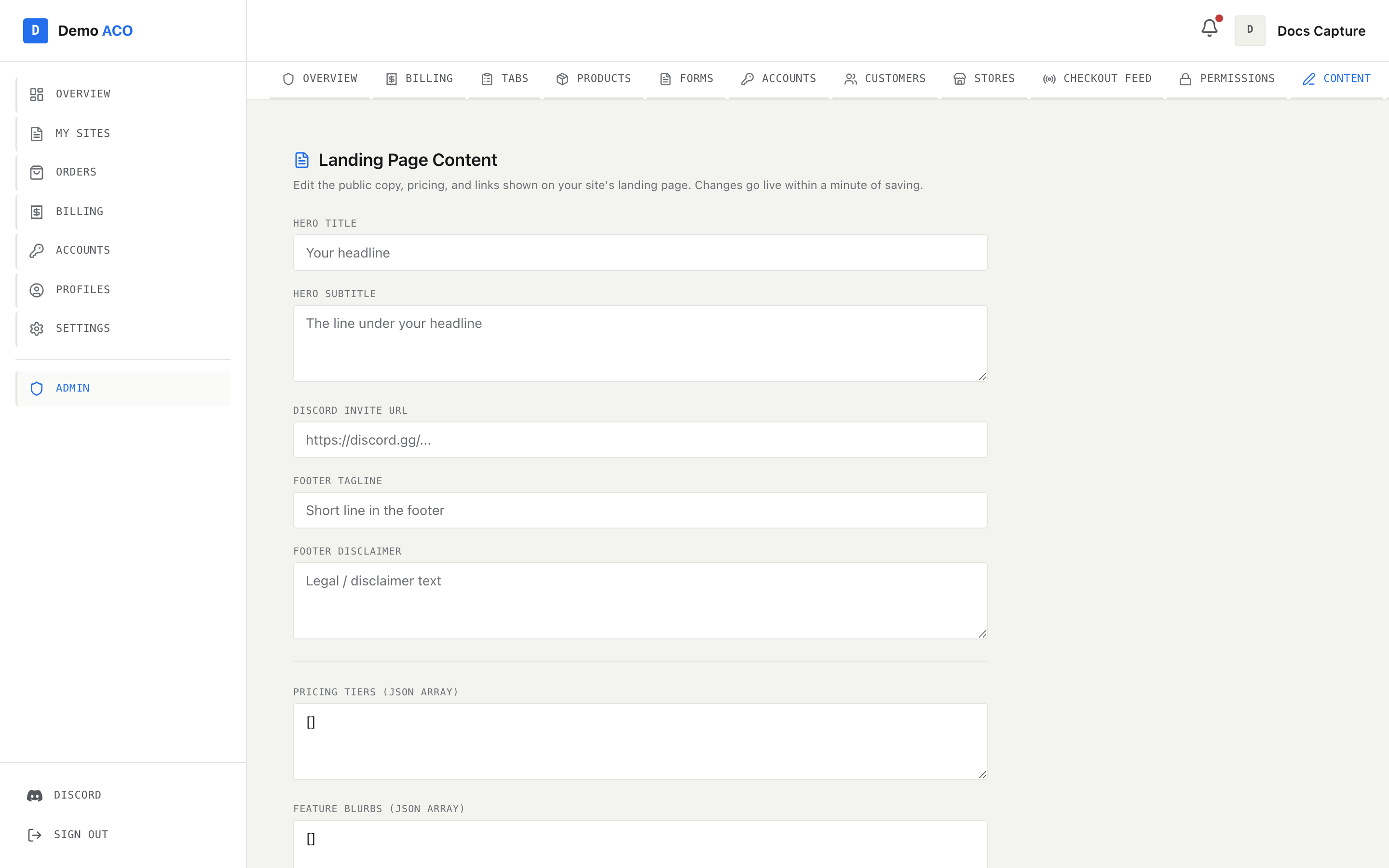
**Admin → Content** edits the public page a visitor sees before they sign in. Seven fields, one **Save Content** button, no preview. Changes go live within about a minute.
Five plain text fields, then a divider, then the two JSON arrays that drive the pricing and features sections.
Like [Branding](/acoservice-documentation/for-tenant-admins/branding.md), this tab only appears for real tenant admins and platform operators. An admin whose access comes from a Discord role alone will not see it, because the API behind it accepts only the tenant-admin claim.
## The text fields
| Field | Where it appears | If you leave it empty |
| ---------------------- | ----------------------------------------------------- | ---------------------------------------------------------------------- |
| **Hero Title** | Stored, but not currently rendered — see below. | — |
| **Hero Subtitle** | The line under the main headline on the landing page. | A generic platform sentence about automated checkouts. |
| **Discord Invite URL** | Every "Join Discord" button on the site. | **The platform's own Discord invite.** |
| **Footer Tagline** | The short line under your logo in the footer. | A generic platform tagline. |
| **Footer Disclaimer** | The small print in the footer's bottom bar. | "Not affiliated with Nintendo, The Pokemon Company, or any retailers." |
{% hint style="info" %}
**Hero Title is saved but not shown.** The landing page's main headline is fixed copy in the current design; only **Hero Subtitle** is read from your content. The field still stores what you type and the API still accepts it, so anything you put there is kept — it simply does not appear on the page today.
{% endhint %}
### The Discord invite matters more than it looks
That single field is used in far more places than the landing page: the landing navbar, the hero's **Join Discord** button, the button on every pricing card, the final call-to-action above the footer, the footer's Community column, the member dashboard sidebar and the member topbar's user menu.
{% hint style="warning" %}
If you leave it blank, every one of those buttons falls back to the **platform's** Discord invite — so your own members get sent to someone else's server. Fill this in before you announce your site.
{% endhint %}
## Pricing tiers
The **Pricing Tiers (JSON array)** box is edited as raw JSON. Each object in the array becomes one invoice-style card in the membership section.
```json
[
{
"name": "Charizard",
"status": "active",
"price": "$25 / checkout",
"description": "Pay only when we secure an order",
"features": ["Priority checkout queue", "All supported stores", "Zelle or card"],
"highlighted": true
}
]
```
| Key | Type | What it does |
| ------------- | ----------------------------- | ---------------------------------------------- |
| `name` | string | Card heading, rendered in uppercase monospace. |
| `status` | `"active"` or `"coming_soon"` | Drives the badge on the card. |
| `price` | string or `null` | Shown large. `null` renders as **TBD**. |
| `description` | string | One line under the price. |
| `features` | array of strings | A ticked list, one row per string. |
| `highlighted` | boolean | Also forces the "Active" badge. |
A card shows a **● Active** badge when `highlighted` is true *or* `status` is `"active"`, and **● Coming soon** otherwise. Every card's button links to your Discord invite.
Nothing about these tiers is connected to what members are actually charged. Billing is driven by your products and SKUs — see [Products and pricing](/acoservice-documentation/for-tenant-admins/products.md) and [Billing and invoices](/acoservice-documentation/for-tenant-admins/billing.md). This field is marketing copy only.
## Feature blurbs
The **Feature Blurbs (JSON array)** box drives the capabilities grid — a ruled matrix of cards, numbered `F-01`, `F-02` and so on in the order you list them.
```json
[
{ "title": "Automated checkouts", "description": "We run the drop for you.", "icon": "ShoppingCart" }
]
```
`icon` is a name, not a URL. Only six names are recognised:
| Value | Icon |
| -------------- | --------------- |
| `ShoppingCart` | Shopping cart |
| `User` | Person |
| `CreditCard` | Card |
| `Calendar` | Calendar |
| `Activity` | Activity line |
| `Users` | Group of people |
Anything else — a typo, a name from another icon set — silently renders a lightning bolt instead. The card still works; it just does not have the icon you meant.
## Rules for both JSON boxes
* Both must parse as JSON, and both must be **arrays**. If either fails, you get an error naming which one ("Pricing tiers: not valid JSON", "Feature blurbs: must be a JSON array") and **nothing at all is saved** — including the plain text fields you edited in the same visit.
* An **empty array does not empty the section.** When your array is empty, the landing page falls back to the platform's stock pricing tiers and feature blurbs. To change what a section says you have to replace its contents, not clear them.
* There is no schema validation beyond "is it an array". A tier missing `features`, or a blurb missing `description`, will save cleanly and then render badly on your public page. Reload the landing page after saving.
## Saving
**Save Content** writes all seven fields at once and confirms with "Landing-page content saved. Changes are live on your site within a minute."
That minute is real: the site caches each tenant's configuration for about sixty seconds. This page also seeds its boxes from that cache, so if you save and immediately reopen the tab you may briefly see the values you replaced. Wait a moment and reload.
## What this page does not edit
Your tenant content also holds a "how it works" step list, a supported-sites list and a product carousel. The footer's **Supported Sites** column is drawn from that list, and it currently has no editor here — ask your platform operator if you need those changed.
## Related
* [Branding](/acoservice-documentation/for-tenant-admins/branding.md) — the colours, logo and wordmark the landing page is painted with.
* [Settings](/acoservice-documentation/for-tenant-admins/settings.md) — server linking, form URLs and the security log channel.
---
# Agent Instructions
This documentation is published with GitBook. GitBook is the documentation platform designed so that both humans and AI agents can read, navigate, and reason over technical content effectively. Learn more at gitbook.com.
## Querying This Documentation
If you need additional information that is not directly available in this page, you can query the documentation dynamically by asking a question.
Perform an HTTP GET request on the following URL with the `ask` and `goal` query parameters:
```
GET https://acoservice.gitbook.io/acoservice-documentation/for-tenant-admins/content.md?ask=&goal=
```
`ask` is the immediate question: it should be specific, self-contained, and written in natural language.
`goal` is what the user is ultimately trying to achieve, the reason they need the answer. Sharing it helps GitBook give you a better, more relevant answer. A goal is most helpful when it describes the outcome the user wants rather than restating the question. For example, with `ask=how do I create an API token`, a goal like `build a script that syncs our docs to a CMS` lets GitBook tailor the answer to that use case.
The response will contain a direct answer to the question and relevant excerpts and sources from the documentation.
Use this mechanism when the answer is not explicitly present in the current page, you need clarification or additional context, or you want to retrieve related documentation sections.