> For the complete documentation index, see [llms.txt](https://acoservice.gitbook.io/acoservice-documentation/llms.txt). Markdown versions of documentation pages are available by appending `.md` to page URLs; this page is available as [Markdown](https://acoservice.gitbook.io/acoservice-documentation/for-tenant-admins/checkout-feed.md).

# Checkout feed

Point your bot at the channels where checkout bots post, and confirm it is actually reading them.

The checkout feed is what turns other people's checkout bots into your members' order history. Your bot watches one or more Discord channels where checkout notifications land, parses each embed, records the checkout, reposts a formatted version in a channel of your choosing, DMs the member it belongs to, and — when auto-accumulate is on — adds the charge to their tab.

Configure it at **Admin → Checkout Feed**. If the feature is switched off for your group the page shows a padlock and "Checkout Feed is not enabled for this group."

{% hint style="warning" %}
None of this works without a **bot token**. Your own Discord application carries three credentials: the **Client ID** and **Client Secret** (OAuth2 tab) power member sign-in to your site, and the **Bot Token** (Bot tab) is what *your* bot logs into Discord with. Supply only the first two and you get a perfect website and a Discord server with no bot in it — and a checkout feed that never fires. See [Your Discord application](/acoservice-documentation/setting-up-your-tenant/discord-application.md).
{% endhint %}

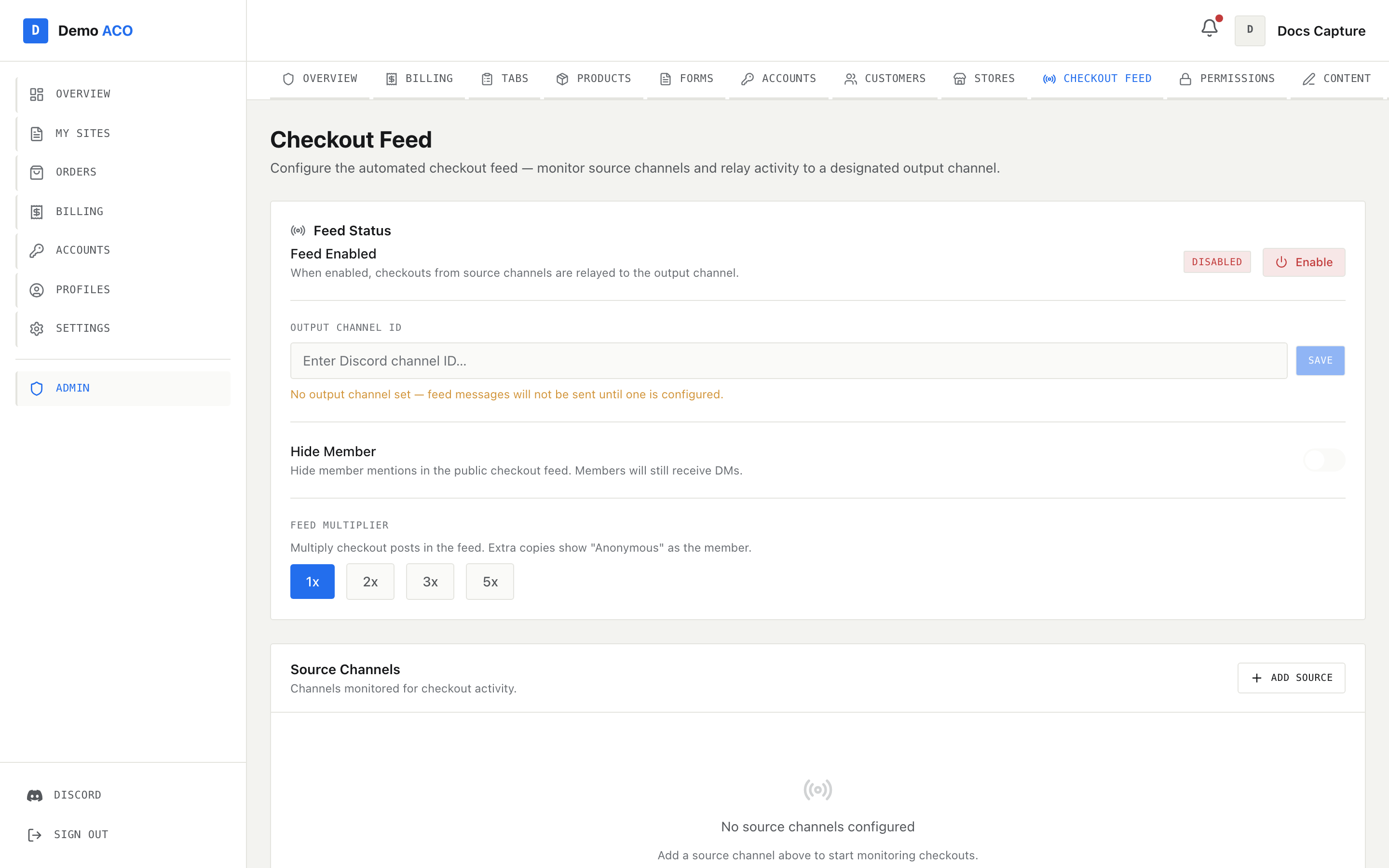
<figure><img src="https://619092889-files.gitbook.io/~/files/v0/b/gitbook-x-prod.appspot.com/o/spaces%2FYF2YIy2qTYyy9j61lr0Y%2Fuploads%2Fgit-blob-1c32d97e542d5e2362e43ff9f3edc0c510990a0d%2Ffeed.png?alt=media" alt="The Checkout Feed page with a disabled feed, an empty output channel field, the Hide Member toggle, feed multiplier buttons and an empty source channel list"><figcaption><p>A freshly-created feed: disabled, no output channel, no sources. The amber line under the output field is the reminder that nothing will be posted until you set one.</p></figcaption></figure>

## Setting it up

The page has two cards.

**Feed Status** holds the switch and the display options:

| Control           | What it does                                                                                                                                                                                                                                                 |
| ----------------- | ------------------------------------------------------------------------------------------------------------------------------------------------------------------------------------------------------------------------------------------------------------ |
| Feed Enabled      | A badge (Enabled / Disabled) and an Enable / Disable button. Off means the bot does not poll at all.                                                                                                                                                         |
| Output Channel ID | The channel your formatted checkout embeds are posted to. Paste a Discord channel ID and press Save; Save stays disabled until you change the value. With none set you get "No output channel set — feed messages will not be sent until one is configured." |
| Hide Member       | Hides the member mention in the public feed. Members still get their DMs.                                                                                                                                                                                    |
| Feed Multiplier   | 1x, 2x, 3x or 5x. Saves on click.                                                                                                                                                                                                                            |

**Source Channels** is the list of channels being watched. **Add Source** opens an inline field — paste a channel ID and press Enter or Add; Escape cancels. The table shows the channel ID and its **Last Message ID**, with a remove button per row. Empty, it reads "No source channels configured".

Everything here takes raw Discord IDs, not a channel picker. Turn on Developer Mode in Discord (Settings → Advanced), then right-click a channel and Copy Channel ID.

Two things must both be true before a single message is read: at least one source channel, **and** an output channel. Missing either, the poller returns immediately even with the feed enabled.

The output channel must be in **your own** Discord server. Source channels do not have to be — your bot can read a checkout channel in any server it has been invited to, which is the normal arrangement when you are in someone else's cook group.

### The feed multiplier

The multiplier is cosmetic. At 3x, one checkout posts three times: once for real, then two extra copies that show "Anonymous" as the member. It does not create extra tab entries, extra DMs or extra checkout records. It exists to make a feed look busier than it is.

## Supported sources

The parser recognises four checkout-bot embed formats:

| Format          | Recognised by                                                           |
| --------------- | ----------------------------------------------------------------------- |
| Shikari         | Author or footer naming Shikari, plus a description with a product link |
| Prism / Refract | Author line in the form `Successful Checkout \| Walmart`                |
| Stellara        | Stellara named in the footer, or a Site field with a bold title         |
| HiddenAIO       | A Module field, or HiddenAIO named in the footer                        |

{% hint style="info" %}
An embed from a bot the parser does not recognise is deliberately **not** guessed at. Its fields are never read, so it is skipped outright — no checkout record, no product, no store, no price, no DM, no tab entry — even if its title says "Successful Checkout". The alternative was worse, because a mis-parsed embed produced a believable status with wrong money attached, and members got invoiced for it. The same applies to a checkout whose *status* text the classifier does not recognise. Skipped embeds are counted in the bot's logs rather than silently dropped, but nothing surfaces in the console: if a source is producing nothing, this is the first thing to check, and the charges have to be added by hand.
{% endhint %}

## How a checkout finds its member

Attribution comes from the profile name on the embed. Three strategies are tried in order:

1. `Retailer - User #7` — the recommended convention, and the cleanest match.
2. `Name TGT 12` — the legacy AYCD-style layout of name, store code, number.
3. Any configured customer identifier found anywhere in the profile string.

The name half is matched against your [Customers](/acoservice-documentation/for-tenant-admins/customers.md); the retailer half against your [store codes](/acoservice-documentation/for-tenant-admins/stores.md).

| Outcome                    | What happens                                                                                                                      |
| -------------------------- | --------------------------------------------------------------------------------------------------------------------------------- |
| Success, member matched    | Recorded, posted to the feed, DM'd, and added to the member's tab if auto-accumulate is on and the product has a price.           |
| Success, no member matched | Recorded and posted to the feed. No DM, no tab entry.                                                                             |
| Review hold                | Same as success, but flagged. Any tab entry is noted as "Review Hold — may be canceled".                                          |
| Decline or cancel          | Recorded, posted to the feed, DM'd. Never billed.                                                                                 |
| Members on free ACO        | Recorded and DM'd as normal; the tab entry is written as already paid, so you can see what they got without their balance moving. |

A checkout whose product has no price, or whose quantity is not a sane number, is still recorded, still posted and still DM'd — only the tab line is withheld. Fix the price in [Products](/acoservice-documentation/for-tenant-admins/products.md), then add the charge by hand.

## Verifying it catches events

Add a source, set an output channel, enable the feed — then prove it works before a drop rather than during one.

**The Last Message ID column on this page is your diagnostic.** When the feed is enabled and an output channel is set, the bot marks each source channel's newest message on its first pass, and that mark appears in the column. A source whose Last Message ID stays `none` is a source the bot cannot see — wrong ID, or the bot is not in that server, or it lacks Read Message History there. Reload the page a minute after adding a source; the column should have filled in.

That first mark also means **the feed starts from now**. Checkouts posted before you added the source are never processed.

To fire a synthetic checkout through the whole pipeline, run `/checkout-feed test` in Discord — there is no console equivalent. It takes a bot format (Shikari, Refract (Prism), Stellara, HiddenAIO), a status (Success, Declined, Canceled (Item Demand), Canceled (by Retailer), Review Hold), and optionally a specific source channel; it defaults to your first source. The command posts a realistic test embed into that source channel.

{% hint style="warning" %}
A test embed is processed exactly like a real checkout — it is saved as a checkout event and posted to your public feed. If its profile string happens to match one of your customers, it will DM them and can land on their tab. Test in a quiet source channel, and check afterwards.
{% endhint %}

Two more Discord-side conveniences, if you are already there: `/checkout-feed status` prints the same three things this page shows — the enabled flag, each source with its last-seen message ID, and the output channel — and `/checkout-feed add-source` refuses a channel the bot cannot see and seeds the mark immediately, where adding one from this page does neither.

## Timing and catch-up

The poller ticks every 5 seconds. When nothing has checked out recently it does real work only about every 30 seconds, and it goes to full speed as soon as a guild sees activity. Feed posts and DMs go out immediately; tab notifications are batched and sent as one message after five quiet minutes.

After a long outage the bot does not replay the backlog. If the last-seen message is more than 24 hours old *and* at least 50 messages have piled up behind it, it skips to the newest message and carries on. Day-old DMs about a drop that is over help nobody — but those checkouts are not recorded, so reconcile them by hand.

Related: [Checkout feed sources](/acoservice-documentation/discord-integration/feed-sources.md) · [Feed not catching checkouts](/acoservice-documentation/troubleshooting/feed-not-catching.md) · [Stores](/acoservice-documentation/for-tenant-admins/stores.md) · [Tabs](/acoservice-documentation/for-tenant-admins/tabs.md)


---

# Agent Instructions
This documentation is published with GitBook. GitBook is the documentation platform designed so that both humans and AI agents can read, navigate, and reason over technical content effectively. Learn more at gitbook.com.

## Querying This Documentation
If you need additional information that is not directly available in this page, you can query the documentation dynamically by asking a question.

Perform an HTTP GET request on the current page URL with the `ask` query parameter, and the optional `goal` query parameter:

```
GET https://acoservice.gitbook.io/acoservice-documentation/for-tenant-admins/checkout-feed.md?ask=<question>&goal=<endgoal>
```

`ask` is the immediate question: it should be specific, self-contained, and written in natural language.
`goal` is optional and describes the broader end goal you are ultimately trying to accomplish on behalf of the user. GitBook uses it to tailor the answer towards what is most useful for that goal.

The response will contain a direct answer to the question and relevant excerpts and sources from the documentation.

Use this mechanism when the answer is not explicitly present in the current page, you need clarification or additional context, or you want to retrieve related documentation sections.
