> For the complete documentation index, see [llms.txt](https://acoservice.gitbook.io/acoservice-documentation/llms.txt). Markdown versions of documentation pages are available by appending `.md` to page URLs; this page is available as [Markdown](https://acoservice.gitbook.io/acoservice-documentation/for-tenant-admins/admins.md).
# The admin console
How to open the admin console, who is allowed in, and what each tab in the admin sub-nav does.
The admin console is where you run your group: the member roster, the product catalog, everyone's tab, billing config, branding and the Discord-side wiring. It lives on your group's own site — `yourslug.acoservice.app` or your custom domain — at `/admin`.
Sign in normally, and if you have admin access an **Admin** entry appears in the left sidebar below your member navigation. Everything under `/admin` applies to that one tenant. If you administer two groups, you administer them on two different sites; there is no combined view.
## Who can get in
Access is checked on the server on every page load, against the tenant whose domain you are on — not against the session you signed in with. Three things grant it, and any one is enough:
| Route in | What it is | Where it is granted |
| ------------------ | ---------------------------------------------------------------------------------------------------------------------------------------------------------------------------------------- | ----------------------------------------------------- |
| Platform admin | The operator of the whole platform | Platform-side, not by you |
| Tenant admin | Named on your tenant's record as an owner/admin | Set by the platform admin when your tenant is created |
| Discord permission | A Discord role or user allowed on the [Permissions](/acoservice-documentation/for-tenant-admins/permissions.md) page — or anyone with Discord's *Administrator* permission in the server | Your own Permissions page |
Because the check re-runs per request, removing somebody takes effect on their next page load. There is no "kick out of admin" button beyond removing the grant.
{% hint style="danger" %}
**If your Permissions page lists no roles and no users, the permission check passes for every member of the Discord server.** An empty allowlist is treated as "not configured", not as "nobody". Any member who signs in on your site then lands in the admin console with access to member data, tabs and billing. Add at least one role or user on [Permissions](/acoservice-documentation/for-tenant-admins/permissions.md) as soon as your server has members.
{% endhint %}
{% hint style="warning" %}
Adding somebody on Permissions is not a "let them use bot commands" grant. It unlocks this entire console, including marking tabs paid and clearing balances. The page says so in a banner for exactly that reason.
{% endhint %}
## Tenant admin versus permissions-only admin
Two surfaces write to the tenant record itself, and those need the **real** tenant-admin claim — being on the Discord permission list is not enough:
* **Content** and **Branding** are hidden from the sub-nav entirely if you are not a tenant admin. The tabs simply are not there. Reaching the URL by hand still renders the editor, but every save comes back refused — the error names the reason, that the action requires a tenant admin.
* Controls elsewhere that write tenant settings behave the same way underneath: the feature toggles on [Billing](/acoservice-documentation/for-tenant-admins/billing.md) and [SKU management](/acoservice-documentation/for-tenant-admins/skus.md), and the Server Link Codes section on [Settings](/acoservice-documentation/for-tenant-admins/settings.md). A permissions-only admin sees those pages, but those particular actions are refused.
This is deliberate. The tenant record holds your Discord client secret, bot token and Stripe keys, and the ability to repoint your tenant at a different bot. Handing that out with a Discord role would mean any helper with the role could take the whole tenant.
If you need somebody to edit branding or landing-page copy, they have to be made a tenant admin, which is a platform-admin action.
## The sub-nav
A horizontal bar sits under the top bar with one entry per admin surface. On narrow screens it scrolls sideways, so check for entries past the right edge before concluding one is missing.
| Tab | What it is for | Shown when |
| ----------------------------------------------------------------------------- | -------------------------------------------------------- | ------------------------ |
| Overview | Business metrics, payouts, billing history | Always |
| [Billing](/acoservice-documentation/for-tenant-admins/billing.md) | Payment methods, auto-billing, Zelle claims | `billing_enabled` |
| [Tabs](/acoservice-documentation/for-tenant-admins/tabs.md) | Every member's running charges | Always |
| [Products](/acoservice-documentation/for-tenant-admins/products.md) | Product catalog and unit prices | Always |
| [Forms](/acoservice-documentation/for-tenant-admins/forms.md) | Form templates and member submissions | `forms_enabled` |
| [Accounts](/acoservice-documentation/for-tenant-admins/accounts.md) | Account credentials assigned to members | `forms_enabled` |
| [Customers](/acoservice-documentation/for-tenant-admins/customers.md) | The matching roster the bot identifies checkouts against | Always |
| [Stores](/acoservice-documentation/for-tenant-admins/stores.md) | Store codes and store names | Always |
| [Checkout feed](/acoservice-documentation/for-tenant-admins/checkout-feed.md) | Source channels and the relay output channel | `checkout_feed_enabled` |
| [SKU management](/acoservice-documentation/for-tenant-admins/skus.md) | Member SKU edit permissions and per-member lists | `sku_management_enabled` |
| [Permissions](/acoservice-documentation/for-tenant-admins/permissions.md) | Which Discord roles and users are admins | Always |
| [Content](/acoservice-documentation/for-tenant-admins/content.md) | Landing-page copy, pricing and links | Tenant admins only |
| [Branding](/acoservice-documentation/for-tenant-admins/branding.md) | Logo, colors, theme | Tenant admins only |
| [Settings](/acoservice-documentation/for-tenant-admins/settings.md) | Server linking and form URLs | Always |
| Docs | Opens this handbook in a new tab | Always |
Note that **Accounts is gated on the same flag as Forms** — turning forms off takes both away.
Billing, Accounts, Checkout feed and SKU management re-check their own flag when the page loads, so typing the URL by hand gets you a "not enabled for this group" notice instead of the page. Forms is the exception: its flag only hides the sub-nav entry. Flags are set per tenant by the platform admin; see [Feature flags](/acoservice-documentation/setting-up-your-tenant/feature-flags.md).
## The Overview page
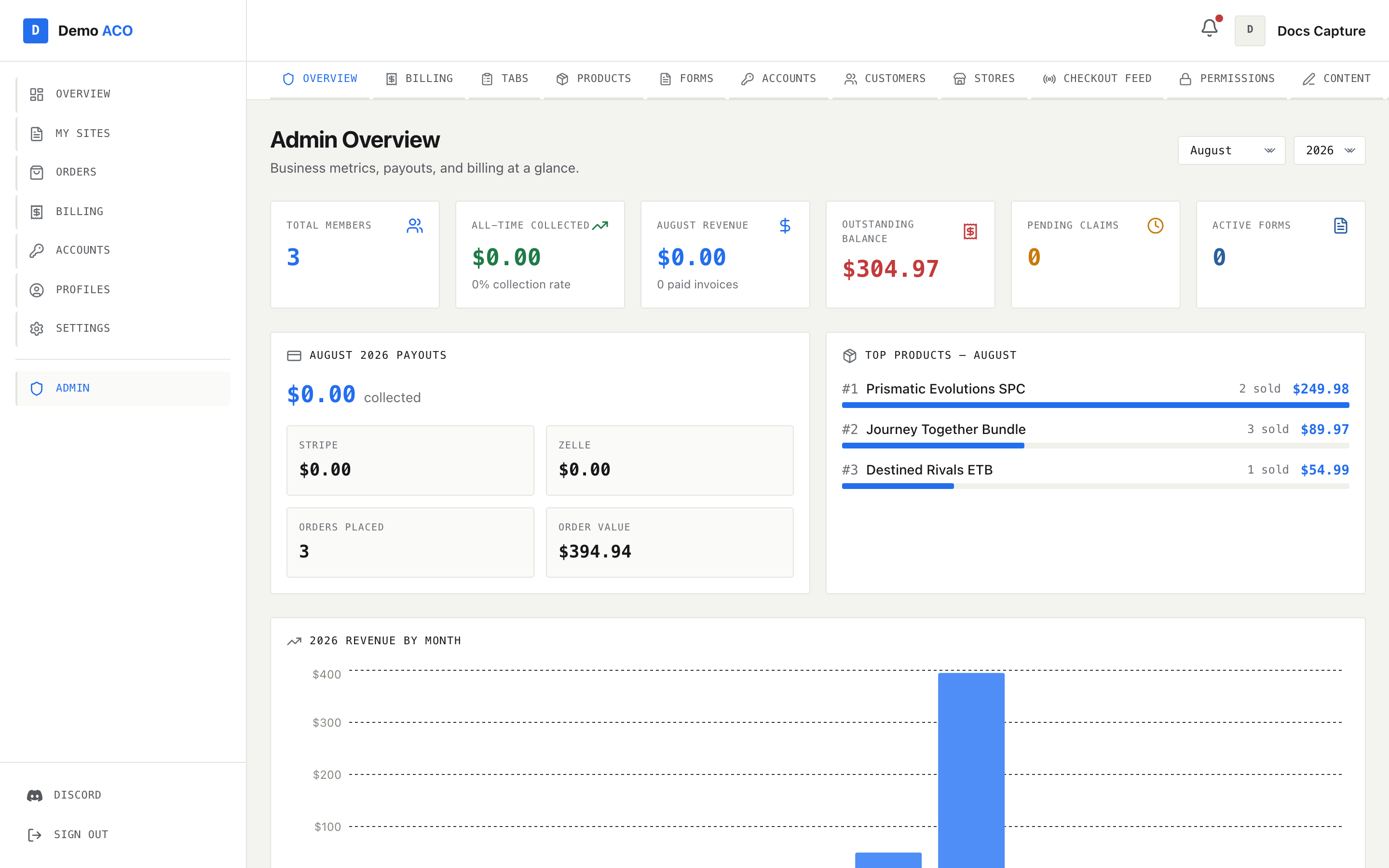
Overview. The month and year selectors at the top right drive every panel below the stat cards.
Six cards across the top:
| Card | What it counts |
| ------------------- | -------------------------------------------------------------------------------------------------------------------------- |
| Total members | Rows on your [Customers](/acoservice-documentation/for-tenant-admins/customers.md) roster — not everyone who has signed in |
| All-time collected | Total collected, with your collection rate underneath |
| *Month* revenue | Collected in the selected month, with the paid-invoice count |
| Outstanding balance | The sum of every open tab right now |
| Pending claims | Zelle claims waiting on your review; shows a **Review** badge when above zero |
| Active forms | Form templates currently live |
Below them, for the selected month: a payouts breakdown split into Stripe and Zelle plus orders placed and order value; a ranked top-products list with units sold and revenue; a revenue-by-month bar chart for the selected year; the billing history table (Invoice, User, Products, Amount, Method, Status, Date) filterable to All / Paid / Pending / Cancelled; and the ten most recent tab entries with relative timestamps.
Only the month and year selectors change what these panels show. The three counters that read "right now" — outstanding balance, pending claims, active forms — ignore them.
{% hint style="info" %}
An amber banner reading **Bot API unavailable — some data may be stale or incomplete** means the console could not reach your tenant's Discord bot. Numbers on the page may be partial. That is usually the bot being offline rather than the site being broken — see [The bot is offline or missing](/acoservice-documentation/troubleshooting/bot-unresponsive.md).
{% endhint %}
## While a platform admin is impersonating your tenant
Impersonation is a support tool: a platform admin can view your site as your tenant. While that is active the admin console is closed — `/admin` redirects to the member dashboard. This is intentional so support sessions cannot make admin changes in your name.
---
# Agent Instructions
This documentation is published with GitBook. GitBook is the documentation platform designed so that both humans and AI agents can read, navigate, and reason over technical content effectively. Learn more at gitbook.com.
## Querying This Documentation
If you need additional information that is not directly available in this page, you can query the documentation by asking a question.
Perform an HTTP GET request on the following URL with the `ask` and `goal` query parameters:
```
GET https://acoservice.gitbook.io/acoservice-documentation/for-tenant-admins/admins.md?ask=&goal=
```
`ask` is the immediate question: it should be specific, self-contained, and written in natural language.
`goal` is what the user is ultimately trying to achieve, the reason they need the answer. Sharing it helps GitBook give you a better, more relevant answer. A goal is most helpful when it describes the outcome the user wants rather than restating the question. For example, with `ask=how do I create an API token`, a goal like `automate deployments from our CI pipeline` lets GitBook tailor the answer to that use case.
The response will contain a direct answer to the question and relevant excerpts and sources from the documentation.
Use this mechanism when the answer is not explicitly present in the current page, you need clarification or additional context, or you want to retrieve related documentation sections.