> For the complete documentation index, see [llms.txt](https://acoservice.gitbook.io/acoservice-documentation/llms.txt). Markdown versions of documentation pages are available by appending `.md` to page URLs; this page is available as [Markdown](https://acoservice.gitbook.io/acoservice-documentation/for-platform-operators/skus.md).
# Target SKUs
The platform-wide Target SKU catalog — products, sets, groups, types, the active-SKU summary and per-member SKU lists.
**Platform → SKUs** is the master product catalog. It is a single shared catalog for the whole platform, not a per-tenant one: every tenant's members pick the SKUs they want from what you maintain here.
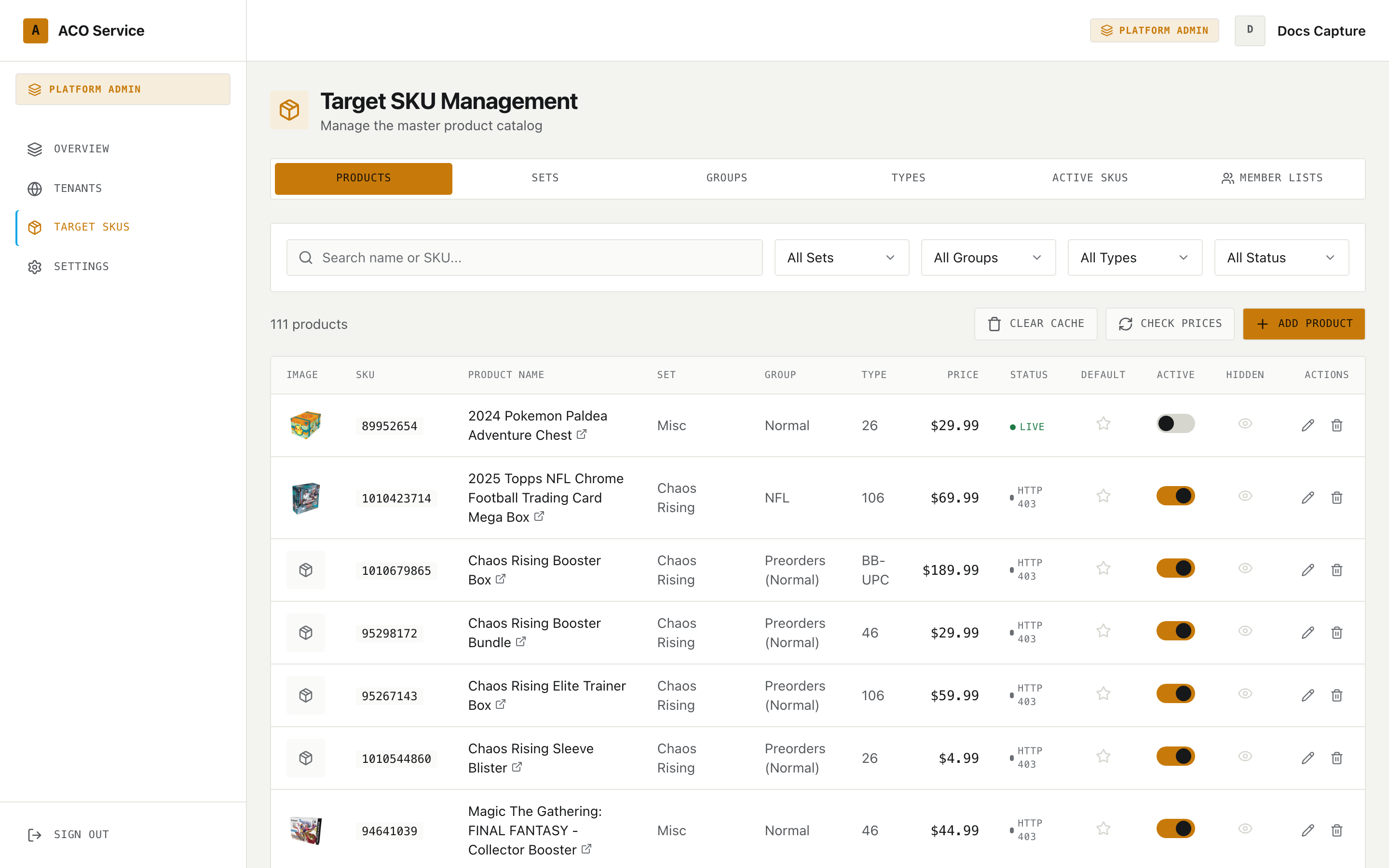
The page header reads "Target SKU Management — Manage the master product catalog", and it has six tabs.
The Products tab. Note the Default, Active and Hidden columns — those three toggles save the moment you click them.
## Products
### Filters
A search box (matching product name or SKU) plus four dropdowns: **All Sets**, **All Groups**, **All Types** and **All Status** (Active / Inactive). Changing any filter resets you to page 1. The count above the table shows how many products match.
### Table columns
| Column | Contents |
| ------------ | ------------------------------------------------------------------------------------------------------------------------ |
| Image | The product image, or a package placeholder |
| SKU | The Target SKU |
| Product Name | The manual name override if set, otherwise the product name, plus a link icon out to the product page when a link exists |
| Set | |
| Group | |
| Type | |
| Price | The effective price — see below |
| Status | Live status — see below |
| Default | A star toggle |
| Active | A switch |
| Hidden | An eye toggle |
| Actions | Edit and delete |
**Price** is the first of these that exists: the manual price override, then the cached scraped price, then the stored retail price. If that works out to zero the cell shows **N/A**.
**Status** is the cached live status if there is one, otherwise the stored live status:
| Status | Colour |
| -------------------------------- | ------ |
| Live | Green |
| Not Live | Red |
| Coming Soon | Amber |
| Anything else, including Unknown | Grey |
### Row toggles
Three toggles act on the row directly, with no save step:
* **Default** (star) — marks the SKU as a default. Hovering says "Set as default" or "Remove from defaults".
* **Active** (switch) — whether the product is in the catalog at all. Inactive products are excluded from the Active SKUs summary.
* **Hidden** (eye) — "Hide from clients" / "Show to clients". A struck-through eye in red means hidden.
All three flip under your cursor immediately and then confirm with the server. If the write is rejected the toggle reverts to its previous value and a message explains why. A toggle that stays where you put it is saved.
### Actions bar
* **Clear Cache** — clears the *last-checked timestamp* on every product that has one. The cached price and status values themselves stay put; wiping the timestamp is what makes the next price check re-fetch instead of returning the cached answer. It reports how many products it cleared.
* **Check Prices** — re-checks prices and live status for the products **on the current page**, not the whole catalog. Results are cached for 15 minutes, so re-checking immediately returns the cached values unless you clear the cache first.
* **Add Product** — opens the product modal.
The table paginates at 50 rows. The empty state is "No products found".
### Adding or editing a product
The modal's first field is **SKU**, with a **Verify** button beside it. Verify looks the SKU up at Target and, when it finds it, fills in the product name, price, live status and image for you, and shows "Product found on Target". When it does not, you get "Not found on Target — fill in details manually below" and you fill the fields in yourself.
Required fields are SKU, Product Name, Set, Group and Type — the create button stays disabled until all five are filled. **Retail Price** is optional.
{% hint style="info" %}
The two **manual override** fields — Manual Name Override and Manual Price Override — only appear when the product's live status is something other than "Live". They are there for products that are not yet purchasable and therefore have nothing to scrape.
{% endhint %}
Three checkboxes finish the form: **Active**, **Default SKU** and **Hidden from clients**, matching the three row toggles.
Deleting a product asks for confirmation first.
## Sets, Groups and Types
Three tabs with the same shape. Each lists its items with **Name**, **Sort Order**, a **Products** count, and edit/delete actions. The Types tab has an extra **Description** column, showing an em dash when empty.
The add/edit modal takes a Name, a Sort Order (used to order the catalog), and — for Types only — an optional Description. Deleting asks for confirmation.
Sort order is what drives the ordering members see, so it is worth setting deliberately rather than leaving everything at 0.
## Active SKUs
A read-only summary of every **active** product, nested group → type. Each group header shows its total SKU count and collapses; each type row shows its count and a comma-separated list of its SKUs with a **Copy** button.
This is the tab to use when someone needs a SKU list to paste somewhere. The empty state is "No active products".
## Member Lists
Every member across the platform who has customised their own SKU list, with their avatar, name, Discord tag and total SKU count. Rows expand into the same group → type nesting, with a Copy button per type and each SKU shown as a chip coloured by live status — green for Live, red for Not Live, grey otherwise. Hovering a chip shows the full product name.
The empty state is "No members have customized their SKU lists yet".
Members who have not customised anything do not appear here at all, so a small list is normal.
---
# Agent Instructions
This documentation is published with GitBook. GitBook is the documentation platform designed so that both humans and AI agents can read, navigate, and reason over technical content effectively. Learn more at gitbook.com.
## Querying This Documentation
If you need additional information that is not directly available in this page, you can query the documentation dynamically by asking a question.
Perform an HTTP GET request on the current page URL with the `ask` query parameter, and the optional `goal` query parameter:
```
GET https://acoservice.gitbook.io/acoservice-documentation/for-platform-operators/skus.md?ask=&goal=
```
`ask` is the immediate question: it should be specific, self-contained, and written in natural language.
`goal` is optional and describes the broader end goal you are ultimately trying to accomplish on behalf of the user. GitBook uses it to tailor the answer towards what is most useful for that goal.
The response will contain a direct answer to the question and relevant excerpts and sources from the documentation.
Use this mechanism when the answer is not explicitly present in the current page, you need clarification or additional context, or you want to retrieve related documentation sections.