> For the complete documentation index, see [llms.txt](https://acoservice.gitbook.io/acoservice-documentation/llms.txt). Markdown versions of documentation pages are available by appending `.md` to page URLs; this page is available as [Markdown](https://acoservice.gitbook.io/acoservice-documentation/for-platform-operators/setup-status.md).

# The setup status checklist

Every row on a tenant's setup status checklist, what it actually checks, and what a failure or a warning means.

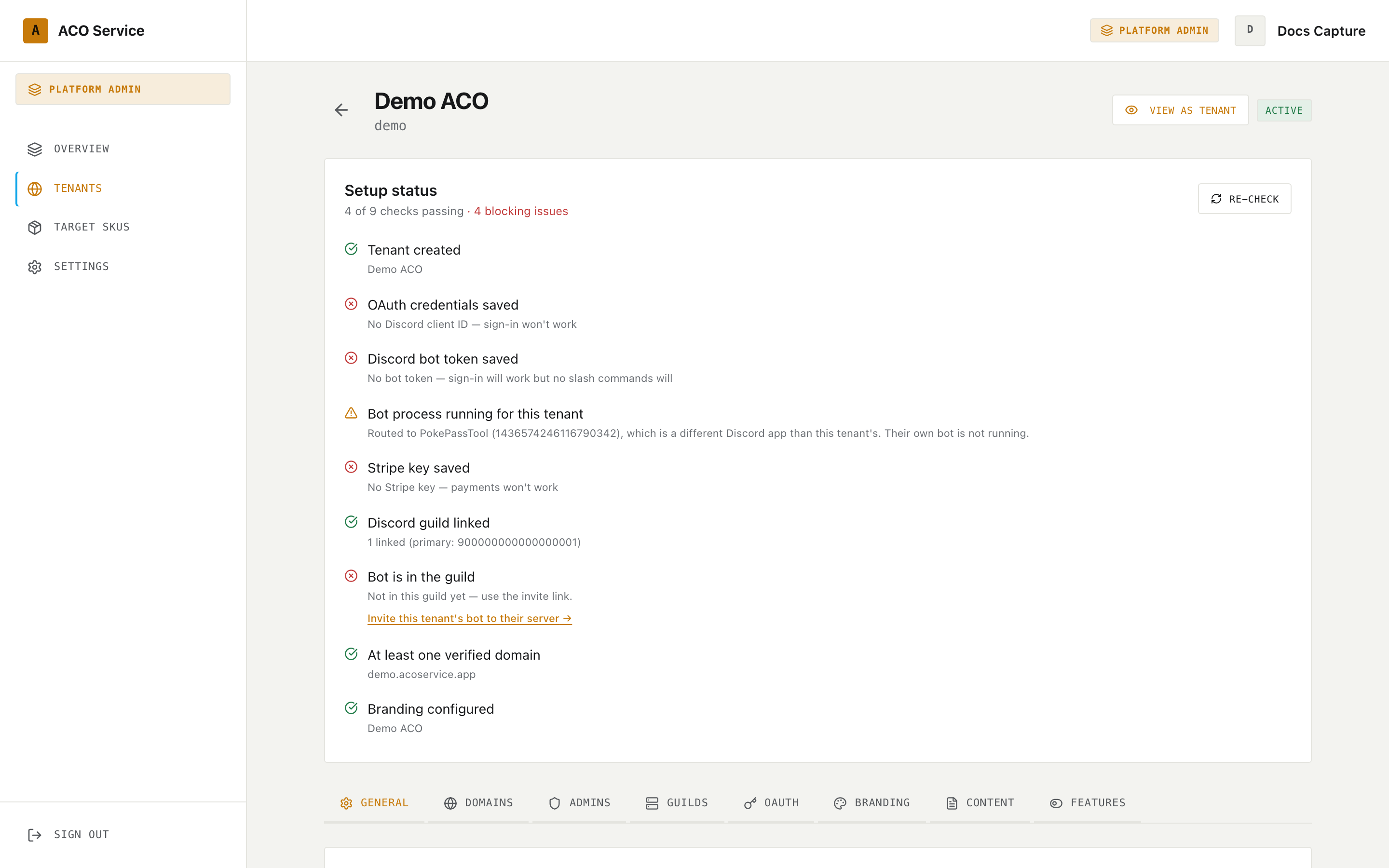
<figure><img src="https://619092889-files.gitbook.io/~/files/v0/b/gitbook-x-prod.appspot.com/o/spaces%2FYF2YIy2qTYyy9j61lr0Y%2Fuploads%2Fgit-blob-cb6395deba1d122f631d9a62cb7a4e65700d97e9%2Ftenant-detail.png?alt=media" alt="The Setup Status checklist on a tenant page, showing passing and failing rows"><figcaption><p>A tenant mid-setup. Note the three bot-related rows: a missing token, a bot process belonging to a different Discord app, and nothing invited to the guild yet.</p></figcaption></figure>

The setup status panel sits at the top of every tenant's detail page, above the tabs. It is not a static list — most rows make live calls to the tenant's own bot and to Discord and Stripe, every time the page loads.

The header reads "*N* of *M* checks passing", plus a red "· *N* blocking issues" when any row has failed. **Only red rows count as blocking.** Amber rows are warnings and do not appear in that count.

**Re-check** re-runs everything.

## Row states

| Icon                 | State   | Meaning                                             |
| -------------------- | ------- | --------------------------------------------------- |
| Green tick           | ok      | The check passed                                    |
| Amber triangle       | warn    | Not fatal, but you should know about it             |
| Red cross            | fail    | Blocking — something the tenant needs does not work |
| Spinner, "Checking…" | loading | The check has not answered yet                      |

{% hint style="warning" %}
A row that stays on **"Checking…"** is not still working. Every live check sets its result to "no answer" when the request fails, and "no answer" renders as the loading state. A permanently spinning row means the platform could not reach the thing it was asking — most often the tenant's bot.
{% endhint %}

## The rows

Some rows only appear under certain conditions, noted below.

### Tenant created

Always green. Shows the tenant name. It confirms you are looking at a real tenant record and nothing more.

### OAuth credentials saved

Green when the tenant has **both** a Discord Client ID and a stored Client Secret. Anything else is red.

Read the detail line carefully: it reports the **Client ID** only. A tenant with a client ID but no stored secret is still red, while the detail line cheerfully shows "Client ID: …". Only the missing-client-ID case spells the consequence out ("No Discord client ID — sign-in won't work").

This is a presence check against the stored record, not a check with Discord. The values themselves are never sent to your browser; the page only learns whether each one is set.

### Discord credentials verified

*Only shown when the Client ID and Client Secret are both present.*

Actually asks Discord whether that ID and secret work together, and shows the application ID it got back.

| Result                           | State                                                    |
| -------------------------------- | -------------------------------------------------------- |
| Discord accepted the credentials | Green — "Valid (app …)"                                  |
| Discord rate-limited the check   | Amber — the credentials are unchanged, try again shortly |
| Discord rejected them            | Red, with Discord's own error                            |

The rate-limit case is amber deliberately. This check re-runs on every page load and Discord limits how often it will answer, so a rate-limit response says nothing at all about whether the credentials are good.

### Discord bot token saved

Green when a bot token is stored ("Stored (encrypted)"). Red otherwise, with the exact consequence: **"No bot token — sign-in will work but no slash commands will"**.

This row exists because the tenant can pass every OAuth check above and still have a completely silent Discord server. Sign-in and the bot are two different credentials on the same Discord application. See [Provisioning a tenant bot](/acoservice-documentation/for-platform-operators/provisioning-a-bot.md).

### Bot process running for this tenant

Asks the tenant's own bot which Discord application it is logged in as, and compares that to the tenant's stored Client ID.

| Result                                             | State                                                                                                                 |
| -------------------------------------------------- | --------------------------------------------------------------------------------------------------------------------- |
| The running bot's application matches the tenant's | Green, showing the bot name and ID                                                                                    |
| It does not match                                  | Amber — "Routed to *name* (*id*), which is a different Discord app than this tenant's. Their own bot is not running." |
| No answer                                          | Stuck on "Checking…"                                                                                                  |

An amber here means the tenant is being served by somebody else's bot process — usually the default one — because their own has never been provisioned. A stored bot token alone does not produce a green row.

### Stripe key saved

*Only shown when the tenant's Stripe feature toggle is on.*

Green when a Stripe secret key is stored. Red otherwise: "No Stripe key — payments won't work". If Stripe is switched off for this tenant, the row is not shown at all.

### Stripe key verified

*Only shown when Stripe is enabled and a secret key is stored.*

Calls Stripe with the stored key.

| Result                      | State                                                          |
| --------------------------- | -------------------------------------------------------------- |
| Valid key, charges enabled  | Green — "Active", with the business name if Stripe returns one |
| Valid key, charges disabled | Amber — "Account exists but charges are disabled"              |
| Stripe rejected the key     | Red, with Stripe's error                                       |

Charges disabled usually means the customer has not finished Stripe's onboarding or verification. The key is fine; the account cannot take money yet.

### Discord guild linked

Green when at least one guild is linked, showing how many and which one is primary. Red otherwise: "No guild linked — ACO members and checkouts won't be tracked".

This is a record check. It does not mean the bot is actually in that server — that is the next row.

### Bot is in the guild

*Only shown when a primary guild is linked.*

Asks the tenant's bot whether it is a member of the primary guild.

| Result    | State                                        |
| --------- | -------------------------------------------- |
| Yes       | Green, with the server name and member count |
| No        | Red, plus an invite link                     |
| No answer | Stuck on "Checking…"                         |

When the bot is not in the guild, the row offers **"Invite this tenant's bot to their server"**. That link invites the **tenant's own** Discord application — falling back to the routed bot's application only if the tenant has none of its own. It requests the Administrator permission and both the `bot` and `applications.commands` scopes.

If the tenant has no Discord application configured *and* no bot is answering, there is nothing safe to invite, so no link is offered — the row just says "Not in this guild, and this tenant has no Discord application configured to invite."

The link pre-selects the tenant's server but deliberately leaves the picker changeable, because a platform operator normally does not have Manage Server in a customer's guild. That makes the link safe to forward to the server owner, who does.

### At least one verified domain

Green when any of the tenant's domains is marked verified. Amber otherwise — never red. The detail line lists every configured domain, or says "No domains configured".

### DNS resolves: *domain*

*One row per custom domain — the platform subdomain is excluded.*

Performs a DNS lookup and, where the platform domain is known, checks the target.

| Result                   | State | Detail                                                                 |
| ------------------------ | ----- | ---------------------------------------------------------------------- |
| Resolves to the platform | Green | "Resolves correctly"                                                   |
| Resolves somewhere else  | Amber | "Resolves, but not to *platform domain*. CNAME may be wrong or stale." |
| Does not resolve         | Red   | "Domain doesn't resolve — set up the CNAME"                            |

A stale amber is common right after a DNS change and usually clears itself. A red means the customer has not created the CNAME record, or created it on the wrong name.

### Branding configured

Green when the tenant has a brand name **or** a logo URL. Amber when it has neither.

The detail line is driven by the brand name alone, so it reads "Using platform defaults" whenever there is no brand name — including on a green row for a tenant that set only a logo. Green plus "Using platform defaults" means "logo, no wordmark", not a contradiction.

The tenant's site works either way; without branding it just carries platform defaults.

## Reading the checklist as a whole

A tenant that is genuinely ready has, at minimum: OAuth credentials saved and verified, a bot token saved, its **own** bot process running, a guild linked with the bot in it, and — if it takes card payments — a verified Stripe key with charges enabled.

The pattern worth watching for is a tenant that is all green except an amber "Bot process running for this tenant". That tenant's website is perfect and its Discord server is doing nothing.


---

# Agent Instructions
This documentation is published with GitBook. GitBook is the documentation platform designed so that both humans and AI agents can read, navigate, and reason over technical content effectively. Learn more at gitbook.com.

## Querying This Documentation
If you need additional information that is not directly available in this page, you can query the documentation dynamically by asking a question.

Perform an HTTP GET request on the current page URL with the `ask` query parameter, and the optional `goal` query parameter:

```
GET https://acoservice.gitbook.io/acoservice-documentation/for-platform-operators/setup-status.md?ask=<question>&goal=<endgoal>
```

`ask` is the immediate question: it should be specific, self-contained, and written in natural language.
`goal` is optional and describes the broader end goal you are ultimately trying to accomplish on behalf of the user. GitBook uses it to tailor the answer towards what is most useful for that goal.

The response will contain a direct answer to the question and relevant excerpts and sources from the documentation.

Use this mechanism when the answer is not explicitly present in the current page, you need clarification or additional context, or you want to retrieve related documentation sections.
