> For the complete documentation index, see [llms.txt](https://acoservice.gitbook.io/acoservice-documentation/llms.txt). Markdown versions of documentation pages are available by appending `.md` to page URLs; this page is available as [Markdown](https://acoservice.gitbook.io/acoservice-documentation/for-members/sites.md).

# Your sites

What site access is, how to read the status on each site card, and why only an admin can change it.

A **site** is one retailer your group runs checkouts for — Target, Best Buy, whatever the group covers. Internally it is a store code; on your dashboard it is a card with the retailer's name on it.

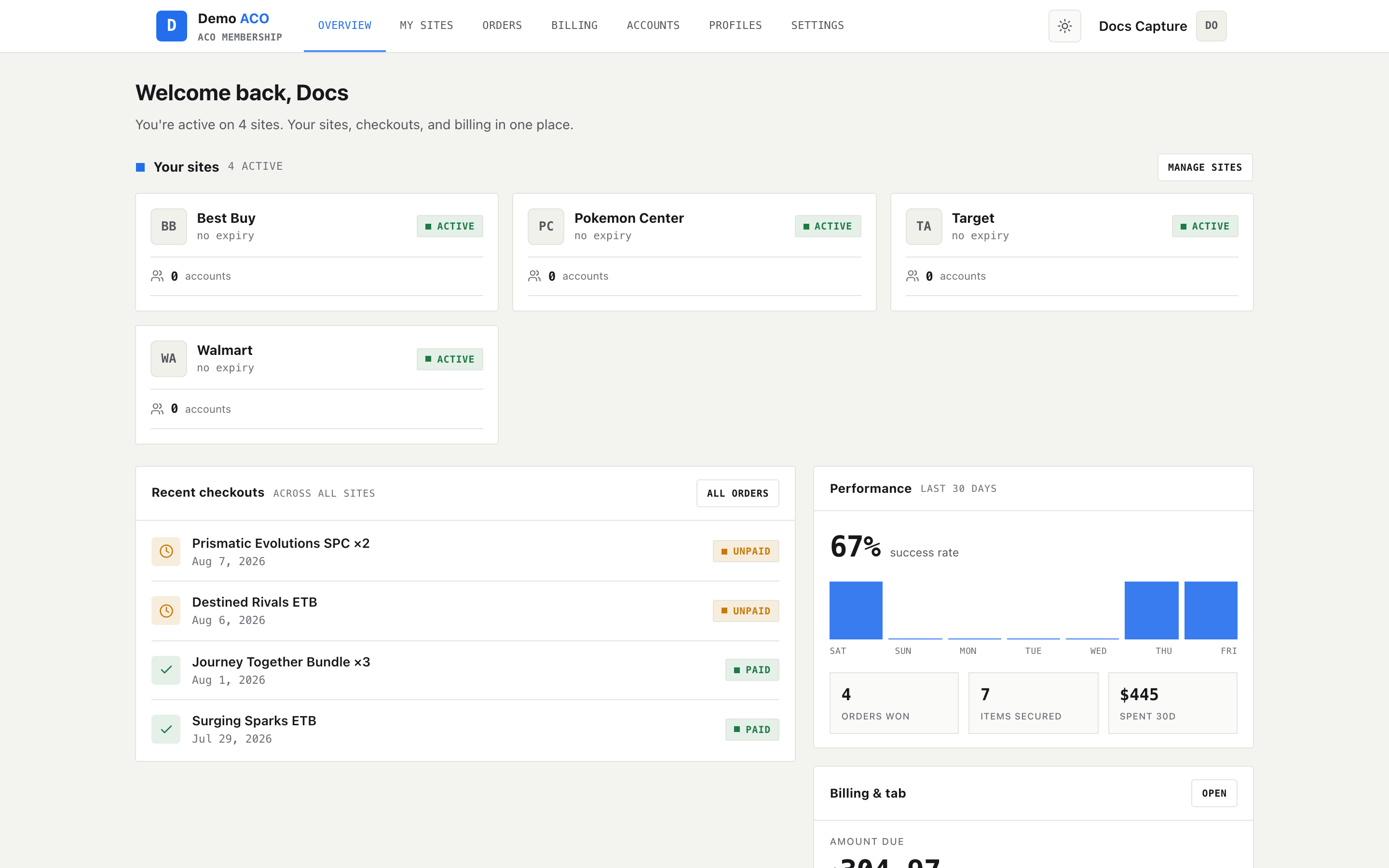
Site access is a record your group keeps of which of those retailers you are entered on. It lives in the **Your sites** panel at the top of your dashboard. There is no page that just lists site access — this panel is the whole of it. (**My sites** in the top nav goes to [Forms](/acoservice-documentation/for-members/forms.md), where you enter sites; it does not open a separate access page.)

<figure><img src="https://619092889-files.gitbook.io/~/files/v0/b/gitbook-x-prod.appspot.com/o/spaces%2FYF2YIy2qTYyy9j61lr0Y%2Fuploads%2Fgit-blob-f9e687fe6b2eccc194ee4dc5ece48794335da235%2Fdashboard.png?alt=media" alt="Member dashboard with the Your sites panel of site cards across the top"><figcaption><p>Your sites sits at the top of the dashboard. The small mono line beside the section title counts your active grants and how many are about to run out; the button on the right, <strong>Manage sites</strong>, goes to Forms.</p></figcaption></figure>

## What a site card shows

Each card carries, in order:

| Element         | What it is                                                                                                              |
| --------------- | ----------------------------------------------------------------------------------------------------------------------- |
| Monogram        | Initials of the store name, in a box. Not a logo.                                                                       |
| Store name      | The name your admin gave the store code, or the raw code if it was never named                                          |
| Validity line   | `no expiry`, `valid until <date>`, `expired <date>`, `entry ended` (expired with no date recorded), or `access revoked` |
| Status tag      | Top right — see the table below                                                                                         |
| Account count   | How many of your store accounts for this site are marked **active**                                                     |
| Remaining bar   | Only for time-limited access, and only when the grant recorded a start date: `N days left` over a progress bar          |
| Select products | Only on active cards, and only if your group has the Products feature turned on. Takes you to the products page.        |

If you are not entered anywhere, the panel reads **You're not entered on any sites yet.** with a **Browse sites** button when the Forms feature is enabled — that button goes to [Forms](/acoservice-documentation/for-members/forms.md), where entering a site actually happens.

## Status values

| Tag           | Meaning                                                                                      |
| ------------- | -------------------------------------------------------------------------------------------- |
| `Active`      | Access is current. With no end date the validity line reads `no expiry` and there is no bar. |
| `N days left` | Active, but with an end date inside the next 7 days. The tag and the bar turn amber.         |
| `Expired`     | The end date has passed.                                                                     |
| `Revoked`     | An admin pulled your access.                                                                 |

Expired is not a stored state. Your access carries an end timestamp or nothing at all, and "expired" is worked out fresh every time the page loads. There is no nightly job to lag behind, so a grant flips to Expired the moment its timestamp passes — not the next morning.

Expired and revoked cards stay on the dashboard. They are history, not clutter to be cleaned up, so a card disappearing is unusual and worth asking about.

## How access appears

Two ways, and neither of them is a button you can press:

* **Automatically, when you enter.** Submitting a store's entry form, or having a store account saved under your name, creates an open-ended grant for that store. Nobody has to approve it.
* **Explicitly, by an admin.** An admin can create a grant, put an end date on one, lift the end date again, or revoke it. This is also the only way to put an end date on access — the automatic route never does.

The member side of the site is read-only here by design. Every write to site access is rejected for members, including on your own record, so there is nothing to try.

{% hint style="warning" %}
**Re-entering does not undo a revoke.** The automatic path only creates access that does not already exist — it will not reactivate a revoked grant. If your access was revoked, submitting the form again changes nothing and the card still reads `Revoked`. Only an admin can restore it.
{% endhint %}

## The account count

The number next to the people icon counts the store accounts assigned to you for that site **that an admin has marked active**. A newly saved account starts inactive, so a card can read `0 accounts` right after you save credentials for that store. That is the account's state, not a sign your site access failed — the status tag is what tells you about access.

See [Accounts](/acoservice-documentation/for-members/accounts.md) for what those accounts are and how they get used.

## What to do when something looks wrong

| Symptom                                       | Where to look                                                                                                                                             |
| --------------------------------------------- | --------------------------------------------------------------------------------------------------------------------------------------------------------- |
| No cards at all                               | You have not entered anything yet — start at [Forms](/acoservice-documentation/for-members/forms.md)                                                      |
| A site you expected is missing                | Your entry may not have gone through; check your submissions on the Forms page                                                                            |
| `Revoked`                                     | Ask your group's admin. Nothing you do on the site will change it.                                                                                        |
| `Expired`                                     | Access was time-boxed and the window closed; an admin can extend or re-grant it                                                                           |
| Checkouts appearing for a site you do not see | Ask an admin — the checkout record and the access record are kept separately, see [Orders and checkouts](/acoservice-documentation/for-members/orders.md) |

Everything on this panel is per-group. If you are a member of two ACO Service groups, each group keeps its own list of your sites — separate records, served by that group's own bot, and neither knows about the other.


---

# Agent Instructions
This documentation is published with GitBook. GitBook is the documentation platform designed so that both humans and AI agents can read, navigate, and reason over technical content effectively. Learn more at gitbook.com.

## Querying This Documentation
If you need additional information that is not directly available in this page, you can query the documentation dynamically by asking a question.

Perform an HTTP GET request on the following URL with the `ask` and `goal` query parameters:

```
GET https://acoservice.gitbook.io/acoservice-documentation/for-members/sites.md?ask=<question>&goal=<user_goal>
```

`ask` is the immediate question: it should be specific, self-contained, and written in natural language.
`goal` is what the user is ultimately trying to achieve, the reason they need the answer. Sharing it helps GitBook give you a better, more relevant answer. A goal is most helpful when it describes the outcome the user wants rather than restating the question. For example, with `ask=how do I create an API token`, a goal like `build a script that syncs our docs to a CMS` lets GitBook tailor the answer to that use case.

The response will contain a direct answer to the question and relevant excerpts and sources from the documentation.

Use this mechanism when the answer is not explicitly present in the current page, you need clarification or additional context, or you want to retrieve related documentation sections.
