> For the complete documentation index, see [llms.txt](https://acoservice.gitbook.io/acoservice-documentation/llms.txt). Markdown versions of documentation pages are available by appending `.md` to page URLs; this page is available as [Markdown](https://acoservice.gitbook.io/acoservice-documentation/for-members/orders.md).
# Orders and checkouts
Where checkout records come from, what each status means, and how a checkout becomes a line on your tab.
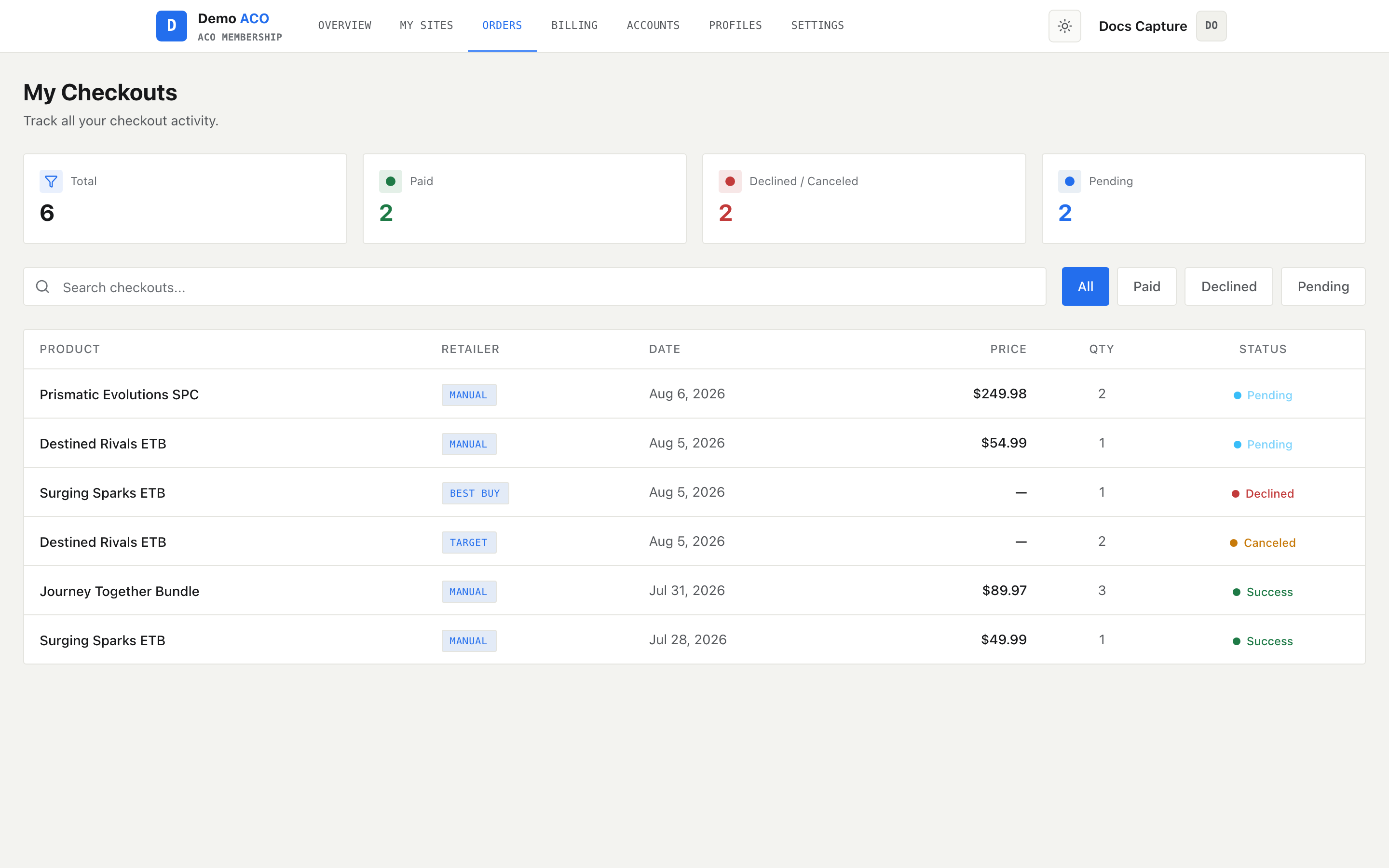
**My Checkouts** is the full history of every checkout your group ran that was attributed to you — the wins, the declines, and the ones the retailer is still thinking about. You reach it from **Orders** in the top nav, or from **All orders** on the dashboard's Recent checkouts card.
Four counters, then search and filters, then the table. Everything below the counters is filtered together.
## Where the rows come from
You never add anything here. Your group runs its own bot, and that bot watches the checkout-feed channel your group's checkout software posts into, reads each checkout message, works out which member it belongs to from the profile name on it, and records it. That feed is internal plumbing — you never have to read it. The record is written within seconds of the checkout happening, whether or not you were at your computer; this page shows you what exists the moment you load it, so refresh if you are watching a drop live.
The table is built from two records that the group keeps separately:
* **Your tab** — the money side. A successful checkout usually also books a line on your tab, which is what gives the row a price.
* **Checkout events** — the audit side. Every checkout the feed parsed, in whatever state it landed in.
Every line on your tab becomes a row — including ones an admin typed in by hand — and declines, cancellations and review holds are added from the events side. That split is why a declined row has no price against it: it never became a charge, so there is nothing to show.
{% hint style="info" %}
Not every successful checkout books a charge you can see. Tab lines are only booked automatically if your group has automatic tab accumulation switched on. If the product has no price set, the line is still booked — at zero — so the row reads **Pending** with `—` in Price until an admin prices the product. If the quantity on the message is not a real quantity, no tab line is booked at all: the checkout is still recorded and still DM'd, but because successes only reach this table through your tab, it will not show here until an admin adds it by hand.
{% endhint %}
## Status values
| Status | What it means |
| ------------- | ------------------------------------------------------------------------------------------------------ |
| `Success` | On your tab and settled — the charge has been paid |
| `Pending` | On your tab, not yet settled. Covers both unpaid lines and lines already rolled into an invoice. |
| `Declined` | The retailer declined the checkout |
| `Canceled` | The order was canceled |
| `Review Hold` | The retailer put the order in review. It may still go through, and it may not. |
| `Unknown` | A safety fallback for a status the page does not recognise. You should never see it; say so if you do. |
The thing to internalise: **`Success` here means paid, not "the checkout worked."** A checkout that worked perfectly sits at `Pending` until you settle it. The counter at the top of the page is labelled **Paid** for the same reason.
For anything that is not a success or a pending charge, the reason the feed reported is printed in small text under the product name — the decline message, the cancellation reason. Review holds get `— may be canceled` appended to theirs.
## The counters
| Counter | Counts |
| ------------------- | -------------------------------------------- |
| Total | Every row on the page |
| Paid | Rows at `Success` |
| Declined / Canceled | Declines, cancellations **and** review holds |
| Pending | Rows at `Pending` |
The counters describe your whole history. They do not respond to the search box or the filter buttons.
## Search and filters
Four filter buttons — **All**, **Paid**, **Declined**, **Pending**. Declined also shows canceled orders and review holds, which is why its count can be higher than the number of literal declines.
The search box matches the product name and the retailer, nothing else. Searching for an order number or a price returns nothing.
## The columns
| Column | Notes |
| -------- | ---------------------------------------------------------------------------------------------------------------------------------------- |
| Product | With the product image when the feed captured one, and the reason line underneath for non-success rows |
| Retailer | A badge. Shows `—` when the checkout could not be matched to one of your group's stores, and `Manual` for a line an admin added by hand. |
| Date | Date only — no time of day is kept on this page |
| Price | The total for the line. `—` for anything that never reached your tab. |
| Qty | Units on the checkout |
| Status | See above |
Rows are newest first. Because only the date is stored on the row, several checkouts on the same day are not ordered by the minute they happened — expect same-day rows in an arbitrary order.
## Review holds are charged
{% hint style="warning" %}
A review hold books a line on your tab straight away, noted `Review Hold — may be canceled`. Most of them ship, which is why it works this way. But if the retailer later cancels the order, nothing on this page notices — the feed reported a hold, not a cancellation. Ask an admin to remove the tab line. It will not clear itself.
{% endhint %}
Because the hold is on both records at once, one review-held checkout shows as two rows: a `Review Hold` row from the events side carrying the retailer's wording, and a `Pending` row from your tab carrying the charge. That is one checkout, charged once — not two.
## Free ACO
If your group has given you free checkouts — for particular stores, or across the board — those checkouts are still recorded here, booked as already paid, so they show as `Success` and add nothing to what you owe. Admins can still see exactly what you got.
## Empty and error states
**No checkouts found.** means the table is empty after filters and search are applied. Before concluding that you have no history, set the filter back to **All** and clear the search box.
**Couldn't load your checkouts.** means the page could not reach your group's bot, and comes with a **Try again** button. This is a distinct message on purpose — an outage should never look like an empty history.
If a checkout you know happened is missing entirely, the usual cause is the profile name on the checkout not matching you, so the bot could not attribute it. That is an admin-side fix.
## How this relates to your tab
Every `Pending` and `Success` row here corresponds to a line on your tab. This page is the checkout view of that data; [Billing and your tab](/acoservice-documentation/for-members/billing.md) is the money view, with invoices and payment. Nothing on this page can be paid from here.
---
# Agent Instructions
This documentation is published with GitBook. GitBook is the documentation platform designed so that both humans and AI agents can read, navigate, and reason over technical content effectively. Learn more at gitbook.com.
## Querying This Documentation
If you need additional information that is not directly available in this page, you can query the documentation dynamically by asking a question.
Perform an HTTP GET request on the current page URL with the `ask` query parameter, and the optional `goal` query parameter:
```
GET https://acoservice.gitbook.io/acoservice-documentation/for-members/orders.md?ask=&goal=
```
`ask` is the immediate question: it should be specific, self-contained, and written in natural language.
`goal` is optional and describes the broader end goal you are ultimately trying to accomplish on behalf of the user. GitBook uses it to tailor the answer towards what is most useful for that goal.
The response will contain a direct answer to the question and relevant excerpts and sources from the documentation.
Use this mechanism when the answer is not explicitly present in the current page, you need clarification or additional context, or you want to retrieve related documentation sections.