> For the complete documentation index, see [llms.txt](https://acoservice.gitbook.io/acoservice-documentation/llms.txt). Markdown versions of documentation pages are available by appending `.md` to page URLs; this page is available as [Markdown](https://acoservice.gitbook.io/acoservice-documentation/for-members/dashboard.md).
# Your dashboard
The first page you land on after signing in, and what each panel tells you.
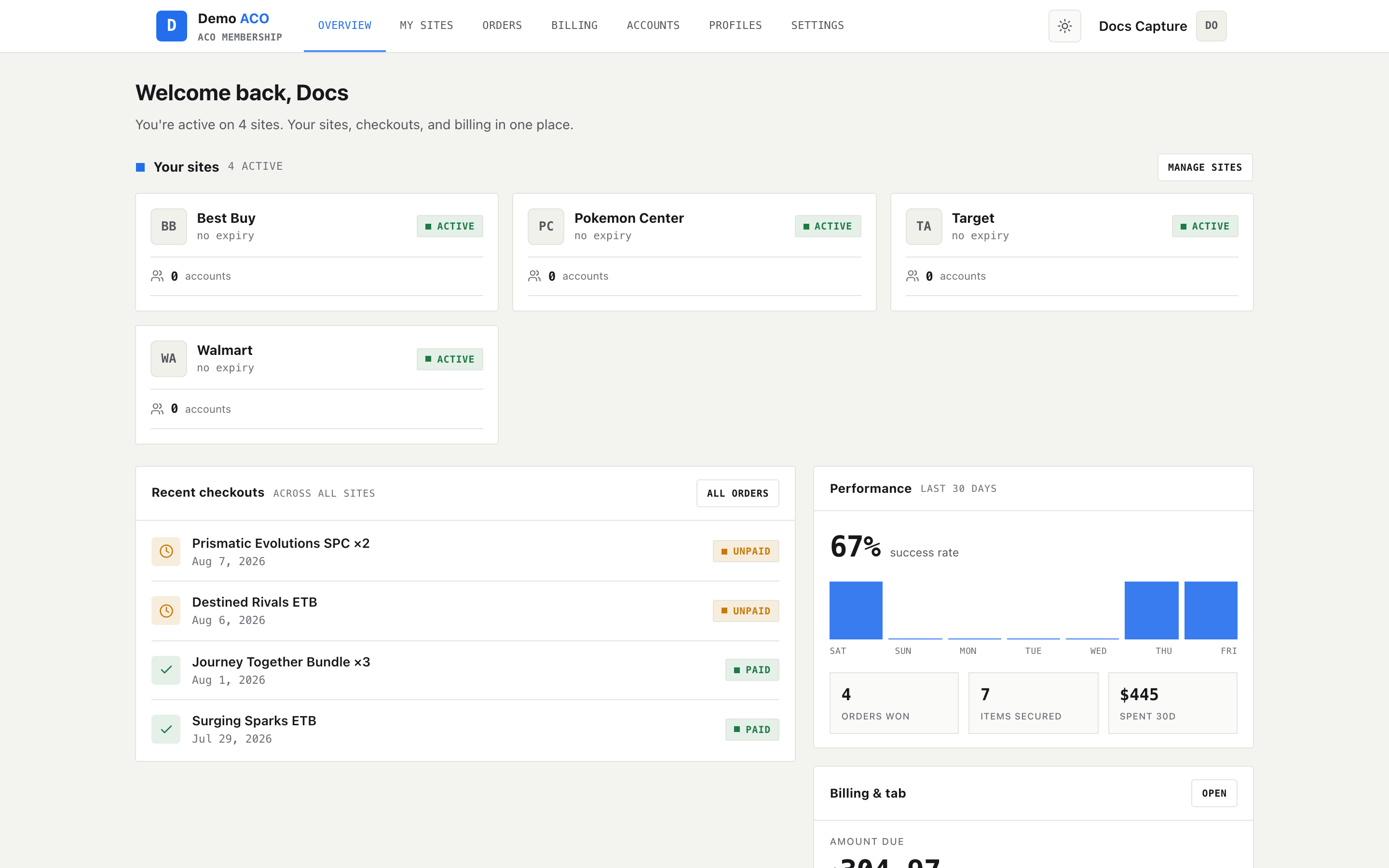
Signing in drops you on **Overview** — a single screen answering "what am I on, what did I win, and what do I owe?"
The member Overview page.
## Your sites
The cards across the top are the sites (retailers) you currently have access to through this group. Each shows the site, whether your access is **active**, and when it expires — `no expiry` means open-ended.
If this panel is empty, you have not been added to any sites yet. That is a question for your group's admin, not something you can grant yourself.
[More about sites →](/acoservice-documentation/for-members/sites.md)
## Recent checkouts
The most recent orders attributed to you, newest first, with the quantity and the date. The badge on the right is the **billing** state, not the order state:
| Badge | Meaning |
| -------- | ------------------------------------- |
| `UNPAID` | On your tab, not yet invoiced or paid |
| `PAID` | Settled |
A checkout appears here automatically when the group's bot sees it in the checkout feed. You do not need to report anything.
[More about orders →](/acoservice-documentation/for-members/orders.md)
## Performance
A 30-day view: your success rate, a per-day bar chart of checkouts, and three totals — orders won, items secured, and the amount spent in that window.
Success rate counts successful checkouts against all attempts attributed to you, so declines and cancellations pull it down. A low number early on usually means a small sample, not a problem.
## Billing and tab
What you currently owe the group, and a shortcut into the full billing page. If nothing is outstanding it reads **PAID UP**.
[More about billing →](/acoservice-documentation/for-members/billing.md)
{% hint style="info" %}
**Everything on this page is per-group.** If you are a member of more than one ACO Service group, each has its own site, its own dashboard and its own tab. Signing in to one does not show you the others.
{% endhint %}
---
# Agent Instructions
This documentation is published with GitBook. GitBook is the documentation platform designed so that both humans and AI agents can read, navigate, and reason over technical content effectively. Learn more at gitbook.com.
## Querying This Documentation
If you need additional information that is not directly available in this page, you can query the documentation by asking a question.
Perform an HTTP GET request on the following URL with the `ask` and `goal` query parameters:
```
GET https://acoservice.gitbook.io/acoservice-documentation/for-members/dashboard.md?ask=&goal=
```
`ask` is the immediate question: it should be specific, self-contained, and written in natural language.
`goal` is what the user is ultimately trying to achieve, the reason they need the answer. Sharing it helps GitBook give you a better, more relevant answer. A goal is most helpful when it describes the outcome the user wants rather than restating the question. For example, with `ask=how do I create an API token`, a goal like `automate deployments from our CI pipeline` lets GitBook tailor the answer to that use case.
The response will contain a direct answer to the question and relevant excerpts and sources from the documentation.
Use this mechanism when the answer is not explicitly present in the current page, you need clarification or additional context, or you want to retrieve related documentation sections.