> For the complete documentation index, see [llms.txt](https://acoservice.gitbook.io/acoservice-documentation/llms.txt). Markdown versions of documentation pages are available by appending `.md` to page URLs; this page is available as [Markdown](https://acoservice.gitbook.io/acoservice-documentation/discord-integration/feed-sources.md).
# Checkout feed sources
The four checkout-bot embed formats the feed can read, and what happens to anything it can't.
Your checkout bots post embeds into a webhook channel. Your tenant's own bot polls those channels and turns the embeds into checkout events, feed posts, member DMs and — if you have auto-accumulate on — tab lines.
That entire chain depends on the bot recognising the embed. If it can't identify which checkout bot produced an embed, it reads nothing from it and books nothing from it. This page is about which formats it knows and how to tell when one has changed.
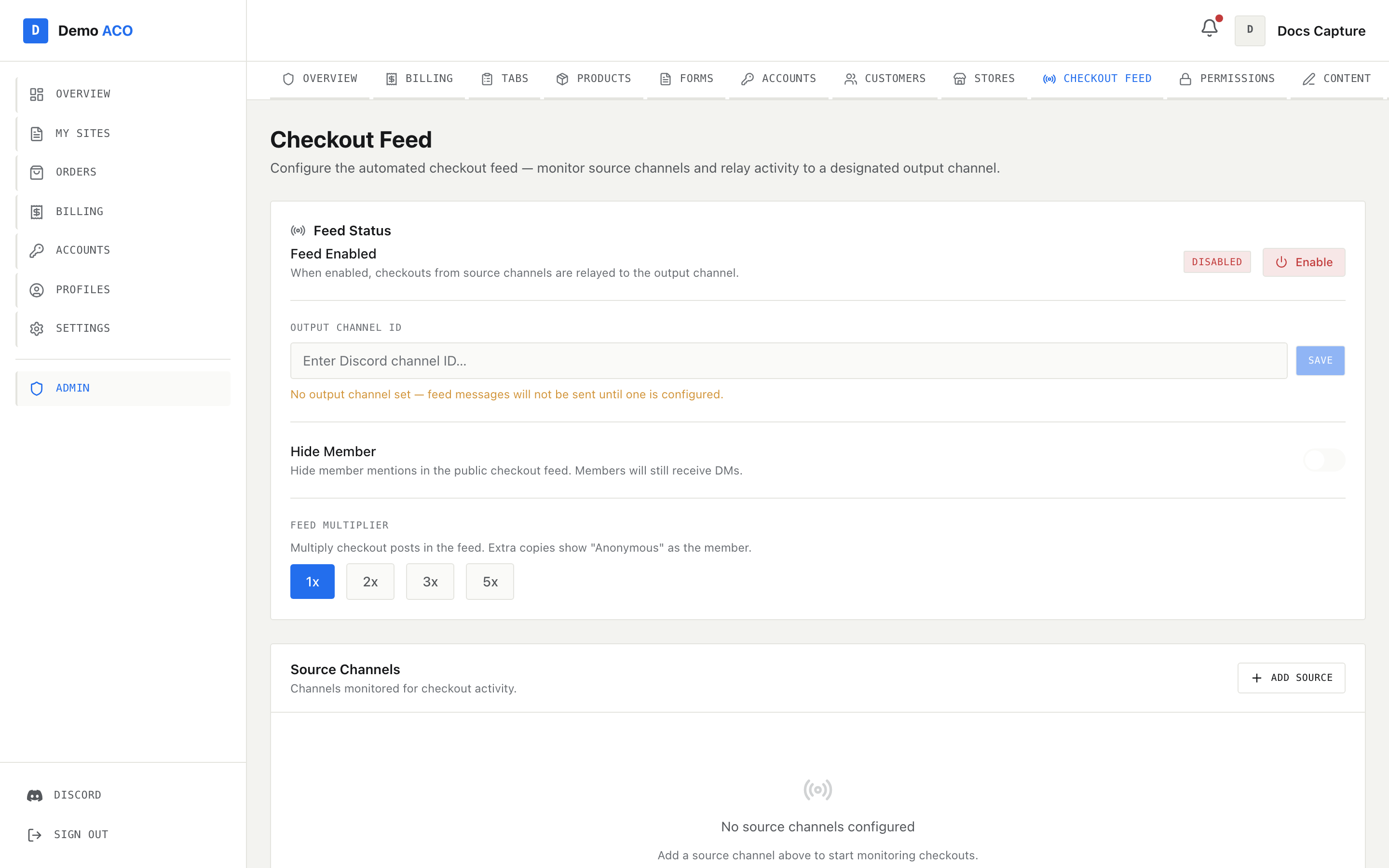
Sources and output are configured here or with /checkout-feed. Both write the same config.
## The four formats
| Format | Recognised by |
| ------------------- | --------------------------------------------------------------------------------- |
| **HiddenAIO** | A `Module` field, or a footer containing "hiddenaio" |
| **Stellara** | A footer containing "stellara" |
| **Shikari** | "shikari" in the author name or footer, plus a description |
| **Prism / Refract** | An author name containing a `\|` separator, e.g. `Successful Checkout \| Walmart` |
Each format also has a weaker fallback rule, for embeds whose footer or author name gives nothing away. Detection tries all seven tests in this exact order and stops at the first match:
1. HiddenAIO — `Module` field, or "hiddenaio" in the footer
2. Stellara — "stellara" in the footer
3. Shikari — "shikari" in the author name or footer, plus a description
4. Shikari fallback — a `Site` field and a description containing a `[` markdown link
5. Prism / Refract — a `|` in the author name
6. Prism fallback — an author name plus a `Product` field
7. Stellara fallback — a `Site` field and bold `**` markers in the title
The order matters: Stellara's fallback is the *last* test, so an embed that would satisfy it but also carries a `Product` field is read as Prism, not Stellara. Anything matching none of the seven is **unknown**, and unknown is handled deliberately — see below.
## Where each format's data comes from
| | Status | Store | Product | Quantity |
| ------------------- | ------------------------------------------------------------------------------------ | --------------------------- | ------------------------------------------------------------------------------------------------------------------------------------- | ----------------------------------------------------------------- |
| **Prism / Refract** | Author name, before the `\|` | Author name, after the `\|` | `Product` field, markdown link stripped | `Quantity` or `Qty` field |
| **Shikari** | Title | `Site` field | The description, markdown stripped | `Quantity` or `Qty` field |
| **Stellara** | Title, bold markers stripped | `Site` field | `Product`, or `Product (1)`…`Product (N)` joined with `+` | `Quantity` or `Qty` field |
| **HiddenAIO** | Title, markdown stripped. If the title is empty, the `❌ Error` field is used instead | `Module` field | The description bullet, with the leading `•`, a leading `3x`, a trailing size in parentheses and a trailing `– 26.94 USD` all removed | `Quantity` field, else the `3x` prefix on the description, else 1 |
Every format is then read for the same shared fields:
| Value | Fields tried, in order |
| ------------------ | ---------------------------------------------------------------------------------------------- |
| Price | `Price`; then, for Stellara only, the sum of `Price (1)`…`Price (N)`; then `Total`. |
| Order number | `Order Number`, `Order ID`, `Order #`, `ID`. A leading `#` and any markdown link are stripped. |
| Email and password | `Email`, then `Account`. A value containing `:` is split into email and password. |
| Proxy | `Proxy Details`, `Proxy`, `Proxy Group` |
| Share link | `Share Link` — the URL is pulled out of the markdown link |
| Profile | `Profile` |
| Image | The embed's thumbnail, else its image |
| Timestamp | The embed's own timestamp, else the message's |
Spoiler bars (`||…||`) are stripped from every field value before anything is read, so a checkout bot that hides card details behind spoilers still parses.
## How a status becomes a decision
The raw status text — whatever the checkout bot wrote — is classified into one of five buckets. Bold markers and ✅ / ❌ are removed first.
| Bucket | Matched when the text | Result |
| --------- | -------------------------------------------------------------------------------------------------- | -------------------------------------------------------------------- |
| `review` | contains "review" or "hold" | Feed post, DM, and a tab line marked *Review Hold — may be canceled* |
| `success` | starts with "successful checkout", "successfully checked" or "checked out" | Feed post, DM, tab line |
| `decline` | contains "declined", "card was declined", "payment declined", "checkout failed" or "card declined" | Feed post and DM only — never billed |
| `cancel` | contains "canceled", "cancelled", "item demand", "quantity limit" or "out of stock" | Feed post and DM only — never billed |
| `other` | none of the above | Nothing. Skipped and logged. |
Review is checked **before** success, deliberately: `Successful Checkout (Review Hold)` is a review hold, not a clean success, and getting that order wrong would bill members for orders the retailer later cancels.
## What happens to formats it doesn't know
This is the part worth understanding, because the failure is quiet by design.
An unrecognised checkout bot still produces an embed with a title, and that title usually still says "Successful Checkout". The status looks perfect. The product, price, quantity and profile were never read, because there was no field map to read them with. Trusting that status would mean invoicing a member for a checkout nobody actually parsed.
So the bot refuses to guess:
* **In the live feed**, an unknown-format embed is counted and skipped. Nothing is saved, nothing is posted to the feed channel, nothing is DM'd, nothing is booked. A warning is logged with the embed's title, footer and field *names* only — never field values, which is where the personal data lives.
* **In `/scrape`**, the row *is* emitted so an admin can see it, but with empty product, store, price and profile, a `Format` column reading `unknown`, and a status of `unknown` that no classifier will ever call a success. It lands in the non-success bucket and is never offered for invoicing.
A status the classifier doesn't recognise is treated the same way: skipped, and logged with the raw status text so it can be taught.
{% hint style="warning" %}
A feed that has gone quiet without any error is the symptom of a format change. If a checkout bot ships an update that alters its footer or restructures its fields, detection stops matching, and every checkout from it silently stops producing feed posts, DMs and charges. The checkouts still happened. Nothing tells your members. Check the feed against real orders after any checkout-bot update — see [Feed not catching checkouts](/acoservice-documentation/troubleshooting/feed-not-catching.md).
{% endhint %}
An embed with no title *and* no author is not treated as an unknown checkout — it is dropped as not a checkout at all.
## Matching a checkout to a member
Recognising the embed is only half of it; the `Profile` field has to resolve to a Discord user. Three strategies are tried in order.
1. **Canonical `Retailer - User #N`** — e.g. `Target - Hussain #42`. The user part is matched against member names and configured identifiers, and the retailer part against your store codes. This is the recommended naming convention and gives the cleanest matches.
2. **`{name} {store_code} {number}`** — the legacy AYCD shape, e.g. `Hussain TG 42`.
3. **Substring search** — every identifier configured by every member is searched for inside the profile string, longest identifier first.
If none match, the checkout is still saved and still posted to the feed — it just isn't attributed to anyone, so nobody is DM'd and nobody is charged. Identifiers are managed with `/aco-member` and `/profile-group`, and store codes with `/store-code`.
## Guards between a parsed embed and a charge
| Guard | Effect |
| ------------------------------------------------------ | ------------------------------------------------------------------------------------------------------------------------------------------------ |
| Quantity too large to store | The whole message is skipped — no event, no feed post, no DM. Add it by hand if it was real. |
| Quantity outside 1–1,000, or an implausible unit price | The checkout is still saved, posted and DM'd; only the tab line is withheld, and loudly logged so an admin can fix the price and add the charge. |
| No price configured for the product | The tab line is added at $0 and the member's notification says *awaiting price*. `/tab fix-prices` applies current prices to unpaid $0 entries. |
| Member is on free ACO for that store | The entry is recorded as already paid, so admins can see what was given away without the balance moving. |
Checkout events are keyed on the guild, the source message ID and the embed's position within that message. Re-reading a batch of messages therefore saves nothing new — a message carrying three embeds is three distinct checkouts, and each keeps its identity across a replay.
## Polling behaviour
* Up to 200 messages are fetched per source channel per poll.
* The last-seen message ID is advanced once per source channel, after the whole batch is processed — not per message.
* Adding a source seeds that pointer to the channel's newest message, so turning the feed on does not replay the channel's entire history.
* If the stored pointer is more than 24 hours old **and** there are at least 50 messages waiting, catch-up is abandoned and the pointer jumps to the channel's newest message. That combination means a long outage or a restored install, and replaying it would mean DMing members about day-old checkouts and billing them again. A small batch after a quiet period is the normal start-of-drop pattern and is processed normally.
* Feed posts that hit Discord's rate limit are retried once after the delay Discord asks for.
## Testing a source without a real drop
`/checkout-feed test ` posts a fabricated embed into one of your configured source channels, in the format you pick. The bot then reads it back through the real pipeline, so you see the feed post, the DM and the tab line exactly as a live checkout would produce them.
Formats: Shikari, Refract (Prism), Stellara, HiddenAIO. Statuses: Success, Declined, Canceled (Item Demand), Canceled (by Retailer), Review Hold.
If a source channel isn't configured yet, the command tells you to add one first. If you pass a channel ID that isn't one of your sources, it refuses.
## Related
* [Checkout feed](/acoservice-documentation/for-tenant-admins/checkout-feed.md) — configuring sources, output, the feed multiplier and member visibility
* [Slash commands](/acoservice-documentation/discord-integration/slash-commands.md) — the full `/checkout-feed` group
* [Notifications and DMs](/acoservice-documentation/discord-integration/notifications.md) — what members receive once a checkout parses
* [Feed not catching checkouts](/acoservice-documentation/troubleshooting/feed-not-catching.md)
* [Wrong member charged](/acoservice-documentation/troubleshooting/wrong-member-charged.md)
---
# Agent Instructions
This documentation is published with GitBook. GitBook is the documentation platform designed so that both humans and AI agents can read, navigate, and reason over technical content effectively. Learn more at gitbook.com.
## Querying This Documentation
If you need additional information that is not directly available in this page, you can query the documentation by asking a question.
Perform an HTTP GET request on the following URL with the `ask` and `goal` query parameters:
```
GET https://acoservice.gitbook.io/acoservice-documentation/discord-integration/feed-sources.md?ask=&goal=
```
`ask` is the immediate question: it should be specific, self-contained, and written in natural language.
`goal` is what the user is ultimately trying to achieve, the reason they need the answer. Sharing it helps GitBook give you a better, more relevant answer. A goal is most helpful when it describes the outcome the user wants rather than restating the question. For example, with `ask=how do I create an API token`, a goal like `automate deployments from our CI pipeline` lets GitBook tailor the answer to that use case.
The response will contain a direct answer to the question and relevant excerpts and sources from the documentation.
Use this mechanism when the answer is not explicitly present in the current page, you need clarification or additional context, or you want to retrieve related documentation sections.