> For the complete documentation index, see [llms.txt](https://acoservice.gitbook.io/acoservice-documentation/llms.txt). Markdown versions of documentation pages are available by appending `.md` to page URLs; this page is available as [Markdown](https://acoservice.gitbook.io/acoservice-documentation/discord-integration/discord.md).
# How Discord fits in
Discord is an integration attached to your site, not the place your members do their work.
Your group's home is its website. Members sign in there, see their orders, save their checkout profiles, watch their tab and pay it. Discord is bolted onto the side of that: it is where checkout notifications physically arrive from your checkout bots, and it is a convenient place to push a message at someone who isn't looking at the site right now.
That is the whole of it. If Discord went away, your members would lose DMs and a handful of slash commands. They would not lose their orders, their profiles, their tab, or their ability to pay.
## Every tenant runs its own bot
There is no shared ACO Service bot that joins everyone's server. Each tenant has its own Discord application and its own bot process, logged in with that tenant's own token, serving that tenant's guilds only.
That application gives you three credentials, and you need all three:
| Credential | Discord tab | What it powers |
| ------------- | ----------- | ---------------------------- |
| Client ID | OAuth2 | Member sign-in on your site |
| Client Secret | OAuth2 | Member sign-in on your site |
| Bot token | Bot | The bot logging into Discord |
{% hint style="warning" %}
The Client Secret and the bot token live on **different tabs** of the Discord developer portal, and people routinely send the first two and forget the third. The result is a site that works perfectly — members sign in, see their tab, pay their invoices — and a Discord server where the bot never comes online. No feed, no DMs, no slash commands. If your site is fine but Discord is dead, this is almost always why. See [Your Discord application](/acoservice-documentation/setting-up-your-tenant/discord-application.md).
{% endhint %}
## What actually happens in Discord
### Checkout feed capture
This is the one job Discord genuinely owns, because it is where the data lands. Your checkout bots post their success and decline embeds into a webhook channel. Your tenant's bot reads those channels, parses the embeds, and turns them into real records.
For each checkout it recognises, the bot:
1. Saves a checkout event, keyed on the source message and the embed's position in it, so a re-read never produces duplicates.
2. Posts a cleaned-up embed to your public feed channel.
3. Matches the checkout's profile string to a member and DMs them.
4. Optionally adds a line to that member's tab, if auto-accumulate is on. A product with no configured price still books a line, at $0 and flagged *awaiting price*.
Everything downstream of that — the order list, the tab, the invoice — is site-side. Which embed formats are understood, and what happens to the ones that aren't, is covered in [Checkout feed sources](/acoservice-documentation/discord-integration/feed-sources.md).
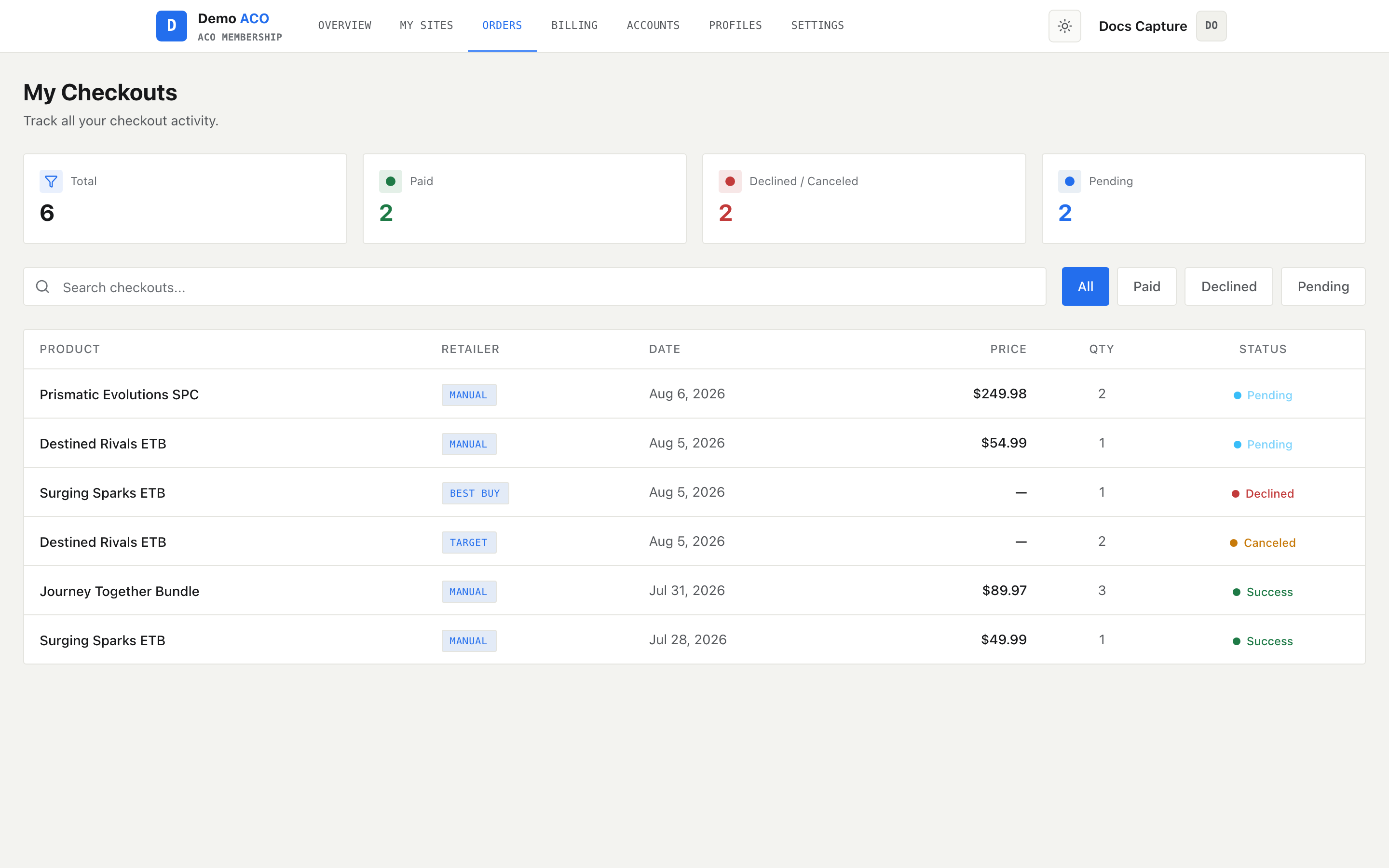
A checkout captured in Discord ends up here. The member reads it on the site; the DM is just the nudge.
### Direct messages
The bot DMs members about checkouts, invoices and payment reminders, and it attaches a working Pay button to invoice DMs. Every attempt is logged, and every category can be switched off by the member. See [Notifications and DMs](/acoservice-documentation/discord-integration/notifications.md).
### A few slash commands
Mostly admin plumbing — configuring the feed, managing tabs and billing, running `/setup`. Members get a small set: view their own tab, submit a form, manage saved cards and addresses, sign up for a release. See [Slash commands](/acoservice-documentation/discord-integration/slash-commands.md).
### Persistent buttons
Invoice payment buttons, form guide panels and the ticket panel survive bot restarts. On startup the bot re-registers the buttons on every pending invoice, every form guide it posted, and the ticket panel, so an invoice DM from last week still pays today.
### Community features
Two things your server can have that have nothing to do with checkouts. Both are off until you turn them on:
* [Support tickets](/acoservice-documentation/discord-integration/tickets.md) — a private channel between one member and your staff, opened from a panel or with `/ticket`, closed with a transcript filed.
* [Moderation log](/acoservice-documentation/discord-integration/mod-log.md) — edited and deleted messages posted to a staff channel.
## What runs in the background
Four loops run continuously while the bot is online.
| Loop | Interval | What it does |
| ------------- | --------------------------------------------------------------------------------------- | -------------------------------------------------------------------------------------------------------------------- |
| Checkout feed | Every 5s, throttled to every 30s when no guild has had a checkout in the last 5 minutes | Reads source channels, posts feed embeds, DMs members, books tab lines |
| Invoices | Every 6 hours | Checks pending invoices against Stripe, marks paid, expires stale ones and releases their tab entries back to unpaid |
| Tab reminders | Every 6 hours | DMs members whose tab is due soon or overdue, and posts to their ticket channel |
| Auto-billing | Every hour | Generates invoices for guilds whose billing day has arrived |
Each loop guards itself per guild and per row: one bad record can't take the loop down for every other tenant, and a loop that dies anyway is restarted rather than left silently dead.
## Where the line falls
| Job | Discord | Site |
| ------------------------------------------ | ------------------------------------ | ------------------------------ |
| Catching checkouts from checkout bots | Yes — this is the source | No |
| Seeing your order history | Only the DM you got | Yes |
| Saving and editing checkout profiles | Cards/addresses only, via `/profile` | Yes — the full profile manager |
| Seeing your tab balance | `/tab view` shows unpaid lines | Yes |
| Paying an invoice | Button in the DM opens the checkout | Yes |
| Notification preferences | No | Yes |
| Branding, products, members, feature flags | No | Yes |
## Before the bot will do anything
A server has to be connected to a tenant before guild-scoped commands work. Until an admin has run `/setup` and the server is linked to a live tenant, commands are refused with:
> ⚠️ This server isn't set up yet — an admin needs to run `/setup` first.
Three commands are exempt, because they have to work in a server that isn't set up yet: `/setup` itself, `/help`, and `/profile` (which is keyed to your Discord account rather than a server). The same gate covers buttons and menus, not just commands — a leftover invoice button in a server whose tenant was deleted will not open a payment session.
When the bot joins a server that isn't linked to any tenant, it posts a welcome message in the system channel (or the first channel it can talk in) pointing an admin at `/setup`.
## Related
* [Your Discord application](/acoservice-documentation/setting-up-your-tenant/discord-application.md) — creating the app and collecting all three credentials
* [Checkout feed](/acoservice-documentation/for-tenant-admins/checkout-feed.md) — configuring sources and output from the admin console
* [The bot is offline or missing](/acoservice-documentation/troubleshooting/bot-unresponsive.md)
* [Members not getting DMs](/acoservice-documentation/troubleshooting/dms-not-arriving.md)
---
# Agent Instructions
This documentation is published with GitBook. GitBook is the documentation platform designed so that both humans and AI agents can read, navigate, and reason over technical content effectively. Learn more at gitbook.com.
## Querying This Documentation
If you need additional information that is not directly available in this page, you can query the documentation dynamically by asking a question.
Perform an HTTP GET request on the current page URL with the `ask` query parameter, and the optional `goal` query parameter:
```
GET https://acoservice.gitbook.io/acoservice-documentation/discord-integration/discord.md?ask=&goal=
```
`ask` is the immediate question: it should be specific, self-contained, and written in natural language.
`goal` is optional and describes the broader end goal you are ultimately trying to accomplish on behalf of the user. GitBook uses it to tailor the answer towards what is most useful for that goal.
The response will contain a direct answer to the question and relevant excerpts and sources from the documentation.
Use this mechanism when the answer is not explicitly present in the current page, you need clarification or additional context, or you want to retrieve related documentation sections.